Online classes have made education accessible for all. Today, we all have the luxury of studying from anywhere and at any time. It is not necessary to travel to a destination to attend classes. We can do that from our home, office, or from a nearby cafe.
While online classes offer multiple opportunities, maintaining a consistent pace and scoring good grades are two of the major challenges for online learners. This is one of the major reasons learners look for online class help from experts.
This blog will take you through the top 5 ways online class help can improve your grades. We will move beyond the basic points of time management and all round support, and discuss how these services can help in the long run.
Before we begin, it’s essential to understand that when we refer to online learners, we are not only talking about college students, but also about working professionals. However, when we talk about the difficulties students face, most of you might wonder, “If online classes are flexible and offer self-learning, then where’s the problem?”
Well, you are not wrong, but when it comes to higher education, there are a few rules and restrictions that learners must follow. First, attending live sessions is a must. Second, completing and submitting assignments on or before the deadline. Finally, it is necessary to prepare well for online exams to score good grades.
All these make online learning difficult for numerous students. Working professionals have a tough time balancing work and study, while college students face difficulties understanding concepts without proper support. This is where online class help services play a pivotal role and help both students and working professionals ace their courses.
Now that you understand the difficulties, let’s move on and learn about the top 5 ways online class help can improve your grades.

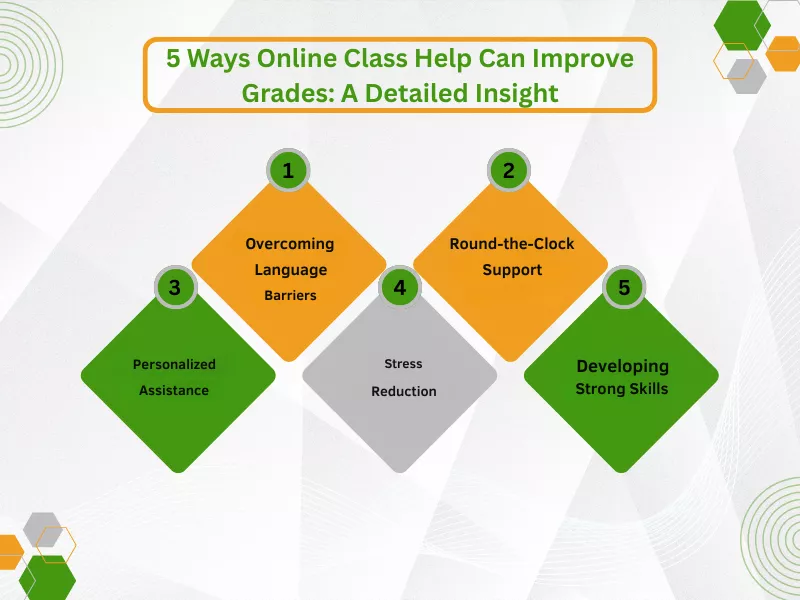
The online class help websites have proved to be of great help for online learners. However, if you are thinking that all they can do is help you complete your assignments on time, you are mistaken. Here are the top 5 ways the experts can help students deal with online classroom challenges:
Students from all over the world can access online courses. However, most of them have a problem understanding the course materials. The reason here is language. Numerous students do not understand the language the materials are in and look for help from the experts.
The online class help services provide multilingual support to students to help them understand the course materials for a better learning experience. The experts can clarify course content, explain technical terms, translate assignments, thus minimizing miscommunication and anxiety, and helping you gain a proper understanding of courses.
One of the major challenges of online learning is that students do not get the necessary support they need every time. The lack of face-to-face interaction and active communication leads to major problems in understanding subjects and, consequently, harms their grades
The websites that help students with online classes are available round-the-clock to provide immediate support. This helps in continuous learning and ensures that you don’t fall behind during your online course. You can hire an expert when you need help with your online class. Schedule a one-on-one session for proper feedback.
Online classrooms lack face-to-face interactions and instant support from teachers and peers. This harms their academic performance as their doubts are not clarified on time. Furthermore, some learners shy away from asking questions during live lectures, thus affecting their overall grades and performance.
The online class help service providers help students with managing deadlines, solving assignment problems, and helping them answer quizzes correctly to get good grades. This is one of the best ways you can improve grades with online class help. Drop a ‘pay someone to do my online class’ request to get the necessary support.
Don’t make the mistake of thinking that the flexibility of online classes makes learning less stressful. Instead, it is the other way round. Remote learners have complained about the stress and anxiety associated with online classes. The reason here is that they are unable to keep up with their studies, live sessions, quizzes, assignments, and exams.
You can get in touch with one of the experts to get the necessary support. You can share a few of your assignments with the experts to reduce your workload and focus on your studies. The experts help reduce stress and anxiety in this way and ensure students don’t face difficulties with their online courses. This is one of the major benefits of online class help for students.
Online schools and institutions aim to help students learn at their own pace. However, there are too many things beyond going through the course materials. You need to work on your communication skills and improve other skills to stay relevant in the rapidly evolving world.
The online class help services offer the best assistance, deliver assignments on time to help students develop strong skills. How do they do that? Here’s how. The experts take care of the workload, thus letting you work on your skills necessary to get the right opportunities. They can also help you learn new things about online classes.
There are multiple benefits of hiring an expert for help with online classes. While most of you are aware of the ways they help manage time and deal with live sessions, the ones mentioned above are added advantages. You must understand the ways they can help you succeed in their career and hire someone to get help with your online classes.
The websites offering help with online classes have helped students overcome the problems and have a great learning experience. Not only do they help boost grades, but they also help improve their skills for better opportunities. With remote learners complaining about stress and anxiety due to online classes, professional online class assistance is probably the best way to overcome such problems.
In addition, the experts also bridge learning gaps by providing personalized assistance, clarifying doubts, and making the subjects easy for all. This not only helps in improving their grades, but it also helps them learn and stay on track with the courses. You can drop a ‘hire someone to take my online class’ request to get the necessary assistance.
Yes, the experts can reduce academic stress and workload, thus encouraging them to manage their mental and physical health. Their support also helps improve students’ academic performance. The websites offering online learning support services have a proven track record for helping students in all aspects.
Well-known service providers ensure secure communication channels and paper submission processes to keep students’ information, grades, and assignments confidential and protected.
Students can use discussion forums, interactive sections, and video guidance for effective communication. This makes online options an important part of the modern education structure. Social media has become increasingly popular among students.
Social media plays an important role in online education. Students can communicate with each other, share tips, highlight program offerings, and guide others to enrol in quality education courses. This can help overcome all the struggles.
Online classes are challenging. Things get overwhelming when you need to manage online education, job assignments, and personal commitments. While success in online learning depends on multiple pillars, one of the most essential pillars is time management. If you can manage your time effectively, you can ace your classes, meet all professional deadlines, and also have enough time to fulfil your personal commitments. Therefore, today we will share 8 time management tips for online class with you.
However, that’s not all; we have also added a case study that shows how time management techniques helped a US student achieve success in an online business management class. Let’s begin!
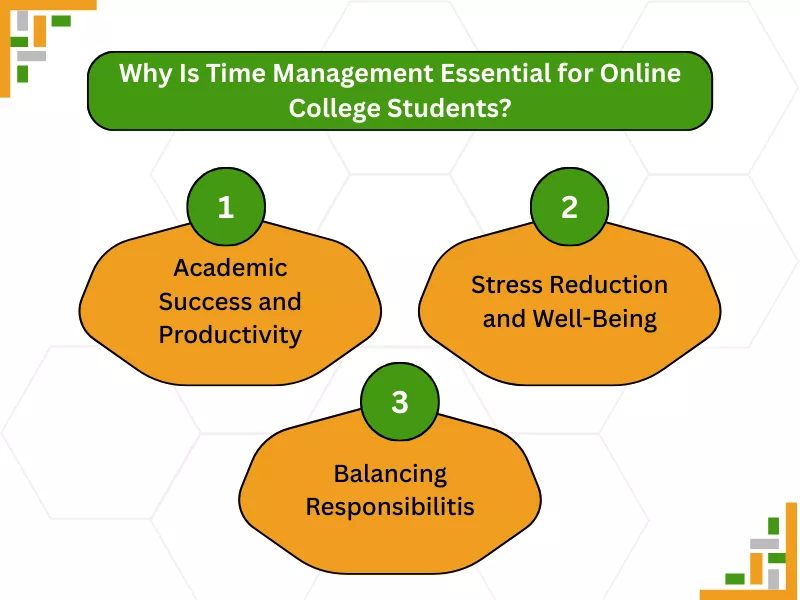
Here’s why most talk about the importance of time management for academic success:
If you’re pursuing an online degree, you already know the struggles of meeting deadlines, staying focused in classes, and dedicating study sessions. Effective time management and online class management services help you prioritize assignments, meet deadlines without pulling all-nighters, and avoid last-minute cramming.
No online learner ever said managing online programs was easy on their health. The constant pressure of looming deadlines induces stress, which directly affects both physical and mental health. These 8 tips for time management for online students help reduce stress and anxiety, thereby improving both physical and mental well-being. Furthermore, it improves focus in online classes.
If you are pursuing a college degree while balancing part-time or full-time job responsibilities, then you must develop good time management techniques. This helps you stay organized, stay on top of your responsibilities, and stay on track to achieve online learning success. In conclusion, time management is essential to allocate proper time for studying, completing assignments, and attending meetings to maintain a productive mindset.
Let’s check out the best time management tips for online students:
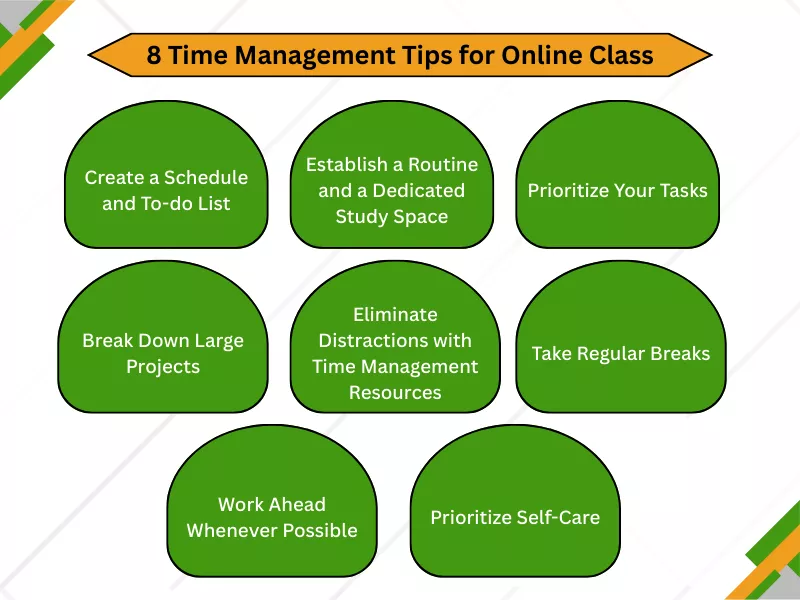
Now, there’s no alternative to creating a proper study schedule and to-do list to ensure you stay on task and finish everything without feeling burdened. When balancing work and studies, you must set aside a proper time to study and to do your work.
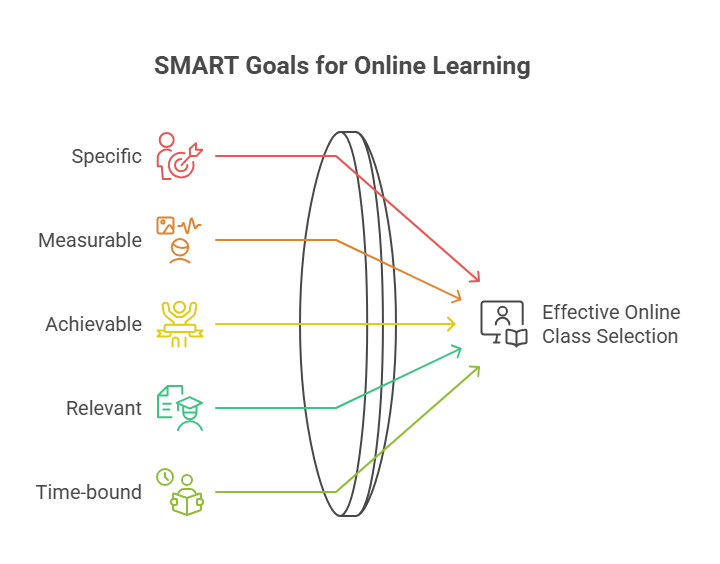
Therefore, create a study schedule that includes all classes, assignments, and upcoming tests. This schedule will also include your office work, and your everyday to-do list should include key responsibilities. This will help you strike tasks off your list once they are done. When creating your schedule, remember your SMART goals, which help you become more productive.
SMART stands for specific, measurable, achievable, relevant, and time-bound.
This means:
Now, when you study at home, you usually ditch the idea of a proper study area or workspace. The bed, couch, or sofa becomes the ideal place to study. However, researchers have found that one of the most best online education success tips is to have a dedicated study space and a properly established routine.
To elaborate, your routine is necessary so you do not procrastinate, because procrastination is your biggest enemy. So, you must have a routine that includes exercise time, study time, and movie time; you do not slack off. Furthermore, you should have a study space with adequate sunlight, a clean desk with the necessary study and work essentials, and no unnecessary gadgets.
Next comes the most essential part. Why so? Most students fail to prioritize tasks based on urgency and importance. Now, even if you have good time management skills, you might not achieve as much as you have the potential to because you end up investing more time than required on unimportant tasks. For this, you use the Eisenhower Matrix.
Remember the to-do list you made, take that out. Now see what’s most important and urgent for you. Then do the following:
Then, finally, use the matrix to know which you need to prioritize, which is undoubtedly one of the best study schedule tips for online learners:
For succeeding in your online class, you must study diligently. However, no one will disagree that studying challenging subjects can make us want to quit. Although it is a fair challenge, we also have a solution for it. One of the best hacks here is to break the challenging assignments into manageable chunks.
A big research paper or final project can feel overwhelming. Break it down into smaller, more manageable steps with their own mini-deadlines. For example, a paper could be broken down into the following stages: research, outline, first draft, revision, and final proofreading. This makes the task less daunting and helps you track your progress. Also, allocate chunks of time to step for effective study habits.
If you ever want to know how to manage time in online classes or online courses, then you need to set time for particular assignments. In order to do that, you need to pay full attention and eliminate distractions. One of the most time-wasting activities includes surfing the internet or scrolling through reels.
To reduce distractions, the best time management tools for students are:
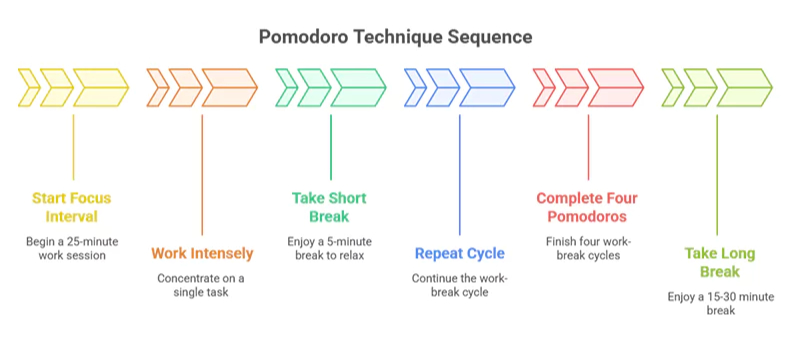
The Pomodoro Technique is a time management method that uses a timer to break down work into focused intervals, typically 25 minutes in length, separated by short breaks.
How it works:
The method is designed to improve focus, prevent mental fatigue, and increase productivity by structuring work sessions with built-in rest periods.
Evernote: A powerful tool for taking and organizing notes in various formats (text, audio, images), syncing them across devices.
In traditional classrooms or traditional college classes, you had to study for hours. However, with online learning, you have the flexibility to study at your convenience. Self-paced learning provides you with the flexibility to schedule your time as needed to complete the material.
Therefore, use it properly and don’t try to power through for hours on end. Incorporate short, regular breaks into your study sessions to prevent burnout and maintain focus. Schedule time to study and also make time for socializing with friends. Furthermore, you can plan quick naps in between, as it helps you study better. Here’s how you can do it:
Practical time management empowers you to focus on one task at a time. Multitasking might sound appealing, but it’s best to avoid it. Reason? It’s a myth that multitasking improves productivity. In fact, switching between tasks can decrease your efficiency.
Therefore, learn how to set a specific time as an online learner for a task and complete it before moving on to another, for increased productivity.
Online students must communicate with friends and instructors not only to stay connected with the world but also to reduce the feeling of loneliness. Make time every day to connect with your peers. You can also form a study group and spend your time finishing homework quickly. Furthermore, networking can significantly enhance your career.
Many online learners complete tasks before the submission deadline. For instance, you planned to invest 1 hour in your ALEKS week 1 homework, but you finished in just 45 minutes. Instead of leaving the study space, you can invest the time to complete another task, such as a discussion post, scheduled for next week. Using time wisely gives you the freedom to be on track and helps you avoid late submission due to sudden challenges.
An integral part of time management isn’t just about scheduling study sessions; it’s also about making time for yourself. Ensure you’re getting enough sleep, eating a balanced diet, and exercising regularly. Schedule time for hobbies and social activities. A well-rested and balanced mind is more productive and resilient. The last and most powerful time management strategy for students is to seek extra support when needed to maintain their health.
A student from Florida (name withheld for privacy) connected with us last month because he was struggling to manage his classes, meet deadlines, and balance his digital marketing job.
Though he could have completed all of it had he been careful and used effective time management strategies. But he procrastinated, and in the last moment, he was behind schedule. Now he had to choose either his work or his studies. However, he later discovered BoostMyGrade, the ultimate solution to all his online class struggles.
So, he thought of outsourcing his business management classes. BoostMyGrade provides the best online class help for students struggling with online classes in over 80 subjects. Here’s how it went!
When he reached out to us to complete his classes, he had two assignment deadlines to meet. He had to complete a project within the next 3 days and a quiz with a 24-hour deadline. Meanwhile, he had an overseas meeting to attend. He could not manage his time to complete all tasks and be present in the meeting simultaneously. So, he chose the best time management technique: Hiring an expert to take his online classes.
We quickly assigned an expert who holds a PhD degree in business management. Our expert connected with him one-on-one and completed the quiz within just 2 hours of assigning the task. Then our expert moved to the project. Our expert not only wrote the assignment from scratch but also added insights from their experience, helping them stand out from the crowd!
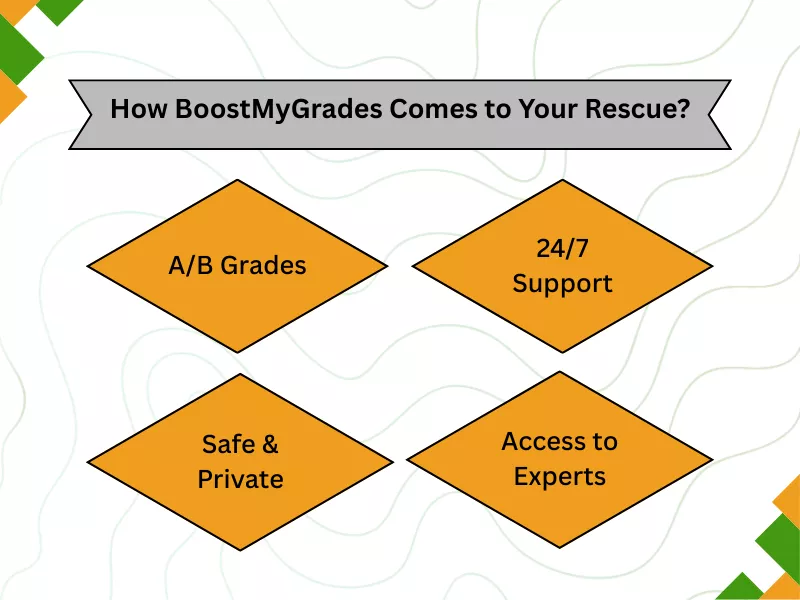
Enjoy the best Pay Someone To Do My Online Class because:
BoostMyGrade guarantees top grades. Now you can reclaim your time while enjoying top grades.
Connect with us 24/7 via LiveChat, email, WhatsApp, or phone; we are always available to assist you.
We never disclose your information to any third party. Our custom VPN across the USA helps us maintain privacy.
We have more than 1000 experts catering to more than 80 subjects, so you can enjoy the time that would usually be occupied trying to figure out answers.
We have listed all these tips to help you succeed in your online classes effectively. However, if needed, taking help is not a bad idea. With effective strategies, you will have ample time to invest in your passion and other things. Furthermore, practical time management helps in juggling multiple responsibilities effortlessly.
TimeCamp, DeskTrack, Clockify, and MyStudyTracker are highly regarded apps for tracking study time.
To create a proper study environment at home, dedicate a quiet, well-lit space away from distractions, such as the TV or high-traffic areas. Ideally, place it near a window for natural light. Additionally, consider investing in an ergonomic chair for enhanced comfort and improved health.
You can use the Eisenhower Matrix to break down assignments by deadline, urgency, and importance using to-do lists. This makes you more productive as well.
Education has transformed rapidly in the last few years. With online learning gaining prominence, students and teachers have started adapting to the changing needs. While remote learning proved to be beneficial compared to in-person learning, it comes with a unique set of problems.
The challenges of coping with the online courses, daily assignments, and homework lead to serious stress and anxiety among students. That makes mental well-being one of the most important concerns in online education.
To ensure you don’t get stressed with your courses, we have a few mental health tips for remote learners. Read and put them into practice for a better online learning experience.
Undeniably, remote learning offers numerous benefits, but it also presents several challenges. While you don’t have to wake up early in the morning to go to school or college, you also do not have anyone to help you when you face difficulties with assignments or other tasks.
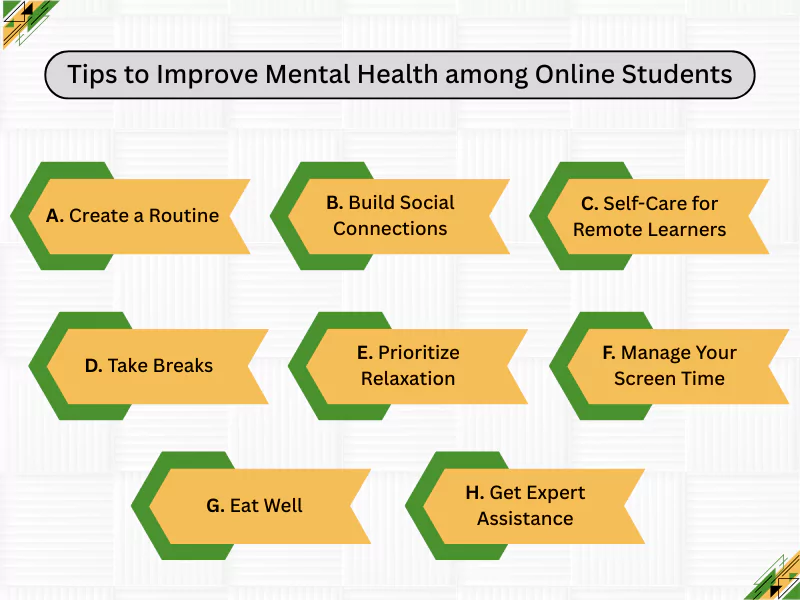
Stress and anxiety are common among online students. With mental wellness being one of the top priorities, students must follow and implement these tips to cope with online courses:
An effective strategy to beat stress is creating a daily routine. Most students do not understand the need for creating a routine and consequently fail to cope with the courses. Divide your work hours for both studying and completing the assignments.
It will help you prioritize the tasks that are more important than others and also attend live classes without being pressured by the schedule. All you have to do is create a schedule and follow it religiously.
A remote learning environment does not allow students to socialize. Feelings of isolation is one of the major problems of online learning, and they affect the emotional well-being of students. Since you do not have any face-to-face interactions, you feel all alone without having anyone to talk to.
The best way to cope with it is by building social connections. Participate in online discussions, talk to your peers, and stay in touch with your instructors to beat the stress. Start a video chat with your peers, discuss the lessons you learned to overcome the problems of isolation.
You need to take care of both physical and mental health. Since you are learning remotely, you will spend most of your time sitting in front of your laptop. Prolonged device usage can often cause major problems both physically and mentally.
The feelings of depression, fatigue, and other such problems are high when you are learning or working from home. You need to find a way to overcome these problems. Mental health professionals talk about a lot of self care practices for remote students, such as daily physical exercise, resting their eyes, etc. Implement them to sail through your courses easily.
Taking breaks is one of the best ways to cope with your online courses. Students have a habit of working for long hours without taking breaks. We understand that you want to complete everything in one go, leading to burnout and deteriorating mental health.
Go for a walk, or have a chat with your friends to refresh your mind and get back to work again. Balancing mental health and online education is possible only if you take the right steps and implement the best actions in your daily routine.
The one thing that is missing among online learners is that they are not relaxed. They are always stressed with the exams, homework, and assignments. Even though the online mode allows flexibility, students often feel stressed with the curriculum.
You need to find some time off from work. Yoga and meditation can help you work on your mental health and stay relaxed throughout the process. These are two of the best ways to cope with the problems and improve your mental health. You can also place a ‘take my online class for me’ query to get help with your homework and assignments.
As mentioned earlier, spending long hours in front of laptops and mobiles is a major problem among online learners. That is also one of the major reasons students face mental health issues. It is necessary for you to manage your screen time to stay on top of the courses.
Implement a mobile or laptop free zone for yourself and schedule some time every day. This will help you in the long run. Since you cannot avoid a laptop or mobile completely, you need to work to give your eyes some rest and disconnect yourself from the online world.
Don’t give up on eating and sleeping in order to complete your assignments or attend live sessions. Numerous students face problems because of their irregular eating and sleeping habits. To ensure you have no problem going through your online courses, you must avoid any disruptions in your daily schedule.
Eat a healthy diet and get enough sleep to concentrate on your academic growth. You would not face any issues with stress and anxiety, and you will also be able to do well in your courses if you are healthy and well-rested.
The best way to maintain your mental health is to get online class help from experts. Delegate a few of your tasks to the experts to ensure a well-planned approach. The pressure of deadlines and exams is the root cause of stress among students. If you receive the necessary help when you need it, you will be able to handle the problems effectively.
Connect with an expert who has the skills and knowledge to not only get the necessary assistance but also to get guidance on the ways to cope with the online courses. Furthermore, you can contact an expert at any time to receive the necessary assistance. This addresses the issue of not receiving help at the right time from instructors.
Before we end this discussion, here are the key takeaways:
Numerous learners have problems managing their online courses. Despite the flexibility it offers, they fail to be productive in their courses and deal with the pressure of assignments and exams. It is crucial to implement the various mental health strategies for online students as listed above to stay on top of the courses and deal with stress and anxiety.
You need to understand the ways for balancing mental health and online education and work towards creating a better study environment. Hire an expert when you are unable to manage the various tasks, and make use of mindfulness to relax your nerves and concentrate on your studies.
Students can employ several strategies to proactively manage stress and negative emotions. Practicing mindfulness, adjusting their morning routine to align with their health, avoiding social media to minimize notifications that negatively impact both their mental and physical environment, and taking breaks are a few ways students can manage stress and negative emotions. It will help them improve their productivity and thrive in the online learning environment.
The best way to cope with the problems of loneliness or isolation is by participating in online discussions, joining video chats with classmates, and regularly communicating with peers. This will help reset students by staying connected and overcoming the feelings of isolation and loneliness.
Spending too much time in front of the device can lead to digital fatigue and mental exhaustion. It is essential to disconnect from the online world, set aside your devices occasionally, and spend some time away from your devices. You need to unwind to nurture your social connections to keep your mental health right.
You need to find a dedicated study space to create boundaries. Since online learning gives you the flexibility to attend classes from home, most of you are prone to getting distracted. It is crucial to find a dedicated study space or workspace, concentrate, use apps to minimize phone distractions, and thoroughly learn the courses.
A strong support system, including family, friends, and peers, can provide the necessary encouragement and guidance. Consequently, it will help you manage stress and relieve yourself more effectively. Furthermore, they can also reach out to a therapist to learn effective ways to manage the pressure of online learning.
You can reset your workday by taking a short walk (for physical movement), doing gentle stretches, or engaging in mindful breathing. You can also try scheduling a few minutes of personal time to recover from mental strain and return to your tasks. Alternatively, you can hit the gym. Having a scheduled time and a small gym arrangement in a place close to your house is really helpful.
The transition to online learning has reshaped the educational landscape, presenting both new opportunities and significant hurdles. For students with special needs, the virtual classroom can be a double-edged sword.
On one hand, it offers the potential for flexible, personalized learning experiences that cater to individual needs. On the other hand, it can amplify existing challenges and create new barriers if not thoughtfully designed and implemented. This guide offers educators essential tips and strategies for supporting students with special needs in an online learning environment.
Additionally, we will examine the common challenges that these students encounter in online education and propose practical solutions to promote an inclusive and equitable classroom environment.
By focusing on building a foundation of accessibility and clear communication, improving engagement and active participation, and personalizing the learning journey, teachers can create a structured and conducive learning environment where every student has the opportunity to succeed. Furthermore, we will examine how specialized online class help services can provide an additional layer of support for students with disabilities, ensuring they have the resources they need to thrive in the digital age of education.
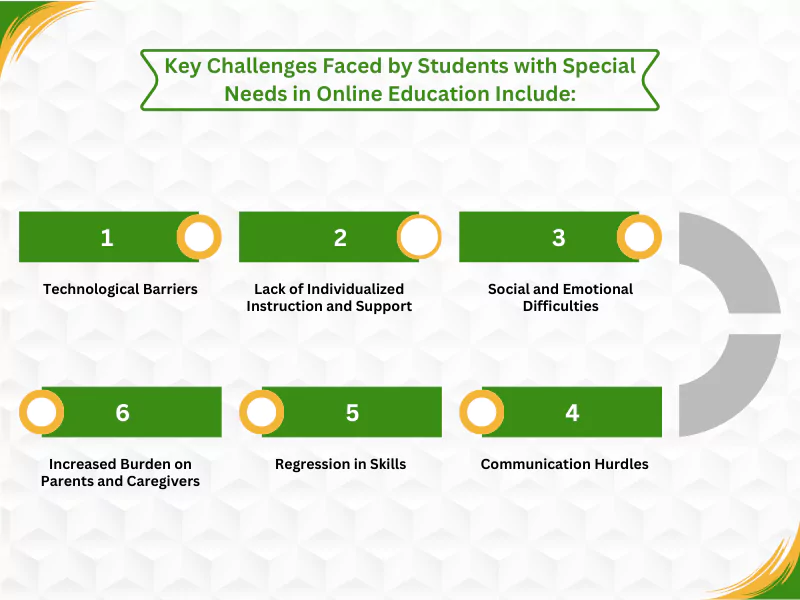
The shift to online learning has presented a unique set of obstacles for students with special needs, often amplifying existing difficulties and creating new barriers to their academic and social-emotional development. While virtual classrooms offer flexibility, they can also lack the structured, hands-on, and individualized support that is crucial for many of these students to thrive.
A primary challenge lies in the difficulty of maintaining focus and engagement in a remote setting. Children with learning differences, such as ADHD, dyslexia, or autism, often require closer supervision and a structured environment to stay on task, which can be difficult to replicate through a computer screen. The home environment can be ripe with distractions, leading to sensory overload and making it difficult for students to concentrate and retain information.
Lack of access to reliable internet and appropriate technology can create a significant learning gap. Furthermore, students may struggle with navigating digital platforms and tools without adequate support.
Many accommodations and services outlined in Individualized Education Programs (IEPs) are challenging to implement in a virtual setting. This includes one-on-one help, specialized instruction, and multi-sensory teaching methods that are often essential for their learning process.
The absence of in-person interaction with teachers and peers can lead to feelings of isolation, anxiety, and depression. This lack of social connection can be particularly detrimental for students with disabilities who may already find social interaction challenging.
Students with speech or language impairments may struggle to express themselves and understand instructions in an online format. The reliance on written communication can also pose a significant obstacle for students with learning disabilities, such as dyslexia.
The disruption of routine and lack of consistent, specialized support can lead to academic and developmental setbacks. One survey found that a significant percentage of parents felt their children were not able to learn effectively remotely and had lost academic skills.
Parents are often expected to take on the role of co-educator, which can be particularly challenging while balancing their own work and responsibilities. This can be especially difficult for parents of children with significant needs who require constant support.
Ultimately, the effectiveness of online education for students with special needs is highly dependent on the ability of schools and educators to provide accessible, supportive, and engaging learning environments that cater to their diverse needs. Without thoughtful and intentional design, the digital classroom can, unfortunately, widen existing educational disparities.
Creating an inclusive and effective online classroom for students with special needs requires a deliberate and thoughtful approach. By focusing on foundational principles of accessibility, communication, engagement, and personalization, educators can build a supportive virtual environment where every learner has the opportunity to thrive. Always remember that each student’s needs are different from the other one.
Here are some of the best practices for supporting special needs students online:
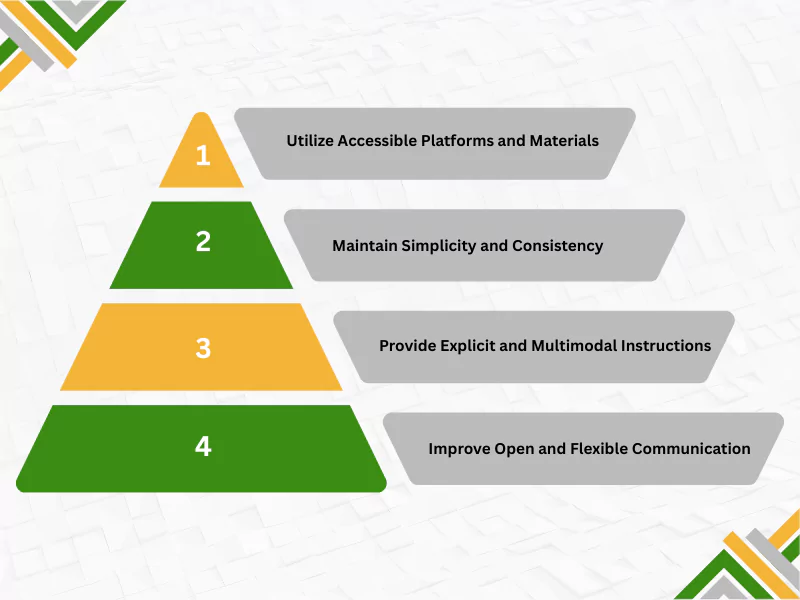
A successful online learning experience begins with ensuring that all students can access materials and understand expectations. This involves proactive design and consistent communication practices.
Select online platforms as well as tools and techniques for special needs online learning that are designed with accessibility in mind. This includes features like compatibility with screen readers (e.g., JAWS, NVDA), closed captioning for videos, adjustable fonts, and high-contrast color schemes. When creating documents, ensure they are accessible so that text-to-speech technology can read them aloud.
Avoid overwhelming students by using a limited number of platforms and maintaining a simple, uncluttered layout. Please provide a clear and simple overview, making it obvious how students should navigate pages and activities. Using simple backgrounds with contrasting fonts can also reduce visual distractions.
Deliver clear, step-by-step instructions for every activity and place them in a consistent, clearly labeled location. Support verbal and written directions with visual cues, such as instruction videos, to enhance comprehension. Ensure instructions are accessible to both students and their caregivers, using formats such as large print or braille if necessary.
Establish clear channels for students to ask for help and offer various modes of communication, such as email, chat, and video calls. Be mindful that some students with disabilities may feel anxious about direct communication like video calls and may prefer text-based options. Regular communication with parents and guardians is also crucial for creating a cohesive support system and ensuring students’ needs are met.
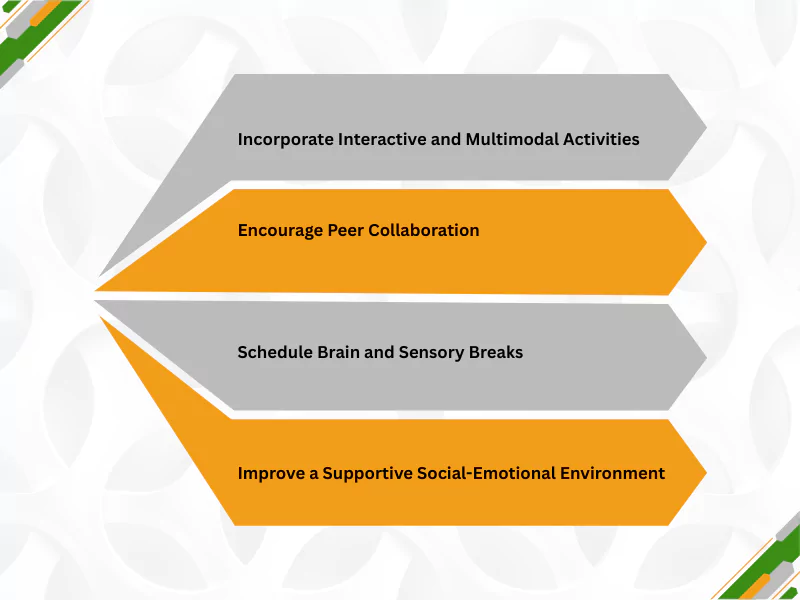
Keeping students with special needs engaged in an online environment requires creative strategies that promote interaction and online learning accommodations for different sensory needs.
Move beyond passive learning by using interactive elements like polls, quizzes, and collaborative projects in breakout rooms. Present content in multiple ways—using a mix of text, video, audio, and interactive simulations—to appeal to different learning styles and senses. For kinesthetic learners, hands-on activities or virtual labs can increase retention.
Facilitate small group activities and discussions to foster a sense of community and mutual support. These interactions help develop social skills and can increase student motivation.
Recognize that online learning can be draining and lead to sensory overload. Incorporate short, scheduled breaks to allow students to rest, reset, and manage sensory sensitivities, which helps maintain focus.
Create opportunities for students to connect on a social level through virtual icebreakers or online clubs. Prioritize building a trusting relationship with each student to promote engagement and overall success. Offering resources for emotional support can also help create a safe and inclusive atmosphere.
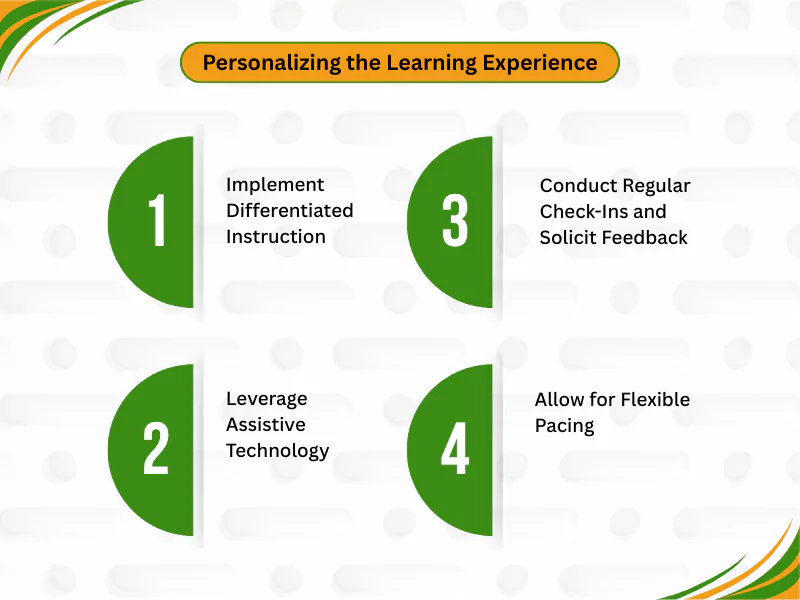
Tailoring instruction to individual needs is a cornerstone of special education. The online environment offers unique tools and opportunities to customize the learning journey for each student.
Adapt the content, process, and product of your instruction to meet the varied needs of your students. This can include offering choices in assignments, using flexible grouping strategies, and providing materials at different reading levels.
Utilize tools that help level the playing field, such as text-to-speech and speech-to-text software, which can significantly enhance literacy skills and comprehension. Many devices also have built-in accessibility settings like screen magnification and voice control that can be activated to support students.
The online format helps teachers allow students to work at their own pace, which is a significant benefit for learners who need more time to process information and can help in implementing individualized education plans (IEPs). Providing recorded lessons allows students to re-watch them as needed to ensure they understand the content.
Schedule regular one-on-one check-ins to discuss goals, progress, and challenges. Solicit feedback from students a few weeks into the course to gauge what is working and what isn’t, which allows you to modify instruction as needed. This personalized communication helps students feel supported and more invested in their learning.
Online class help services identify an individual’s needs and tailor their support accordingly. An ADHD child’s most significant challenge is being attentive in class from start to finish. Evidently, the lack of it often makes it difficult for them to manage their online courses, as self-paced learning requires diligence and dedication. The flexibility often becomes the reason they fail to get top grades.
When they hire an expert, they sign up for expertise that helps them get top grades without missing deadlines and manage their stress. While the experts take their class online, students can concentrate on learning and improve their conceptual understanding.
Furthermore, take my online class for me requests are addressed 24/7 because experts are always available. Additionally, communicating directly with the experts provides peace of mind, which most students value. Last but not least, experts guarantee grades in online classes and exams. A survey on special needs education online reveals that most students become anxious during exams due to pressure, even though they have prepared well. Therefore, students get top grades, which helps in their professional development.
For students with special needs, particularly those with conditions like Autism Spectrum Disorder (ASD) or ADHD, a structured and predictable environment is not just beneficial—it’s often essential for effective learning. The online classroom can feel abstract and boundless, which can heighten anxiety and create cognitive overload. By intentionally creating a structured, consistent, and supportive online space, educators can mitigate these challenges and provide the stability needed for students to feel safe, focused, and ready to learn.
A primary benefit of a structured environment is that it reduces the mental energy students expend on figuring out what to do and how to do it, allowing them to focus their cognitive resources on learning. Predictable routines and clear expectations help minimize anxiety and challenging behaviors that can arise from uncertainty or unexpected changes. When a student knows the daily schedule, where to find assignments, and how to ask for help, their world feels more manageable and secure.
The four main classroom management styles are authoritarian, authoritative, permissive, and indulgent. The autocratic session style is highly controlling with low student involvement. The authoritative style strikes a balance between high teacher control and high student involvement, often considered the most effective. The permissive style has low power and low participation. The indulgent style exhibits high involvement but low control, often with the teacher acting more like a friend than a disciplinarian.
The five steps of the special education process, as outlined by the Individuals with Disabilities Education Act (IDEA), are:
Referral and Evaluation: A student is identified as potentially needing special education and is then evaluated to determine the specific services required.
Eligibility Determination: A team reviews the evaluation to determine if the student is eligible for services.
IEP Development: An Individualized Education Program (IEP) curriculum is created to outline specific goals and services.
Service Implementation: The school provides the special education online resources, services, and supports, including inclusive online teaching strategies outlined in the IEP.
Annual Review: The IEP is reviewed and updated at least once a year to ensure it continues to meet the student’s needs.
Supporting students with special needs in virtual classrooms requires adaptability and personalization. Utilize visual aids and interactive software to enhance the engagement of lessons to get to know your students. Provide accommodations like closed captioning, screen readers, and text-to-speech tools. Maintain a consistent schedule, monitor their behavior, collaborate with them, and establish a routine to reduce anxiety. Consistently communicate with parents or caregivers to offer a holistic and proactive approach, to invite and encourage students to demonstrate their talent and skills, and to motivate them.
To support students with differing abilities, implement differentiated instruction tailored to individual learning needs. Schools must use flexible grouping to create small groups for specific activities and tasks. Offer tiered assignments and assessments with varying levels of complexity, but with the same learning goal. Provide a variety of learning materials and give students choices in how they demonstrate their understanding. Promote a classroom culture of empathy and inclusion where every student’s contribution is valued and respected, and celebrate each little achievement.

Welcome to the world of higher education, where online discussions and group projects are integral to the learning experience. For many US college students, these collaborative assignments can be a source of both excitement and anxiety.
This guide offers a comprehensive overview of navigating the challenges and reaping the benefits of online discussions and group projects.
We will also explore a range of topics, from online collaboration techniques to effective communication strategies, helping you become a confident and valuable member of any virtual team.
An online discussion group is a virtual space where students and instructors can interact, share ideas, and collaborate on course material.
These discussions can take place on various platforms, such as a discussion board or discussion forum within a learning management system.
The goal is to create a dynamic learning environment through collaborative discussion where every student has a voice.
While there are many ways to structure online discussions, they often fall into three main categories:
1. Instructor-led Discussions: The instructor initiates the conversation with specific questions or prompts.
2. Student-led Discussions: Students take the lead in facilitating discussions, often based on assigned readings or topics of their choice.
3. Open-ended Discussions: These are more informal and allow for a free-flowing exchange of ideas.
Every successful group discussion progresses through a predictable journey. Understanding these five stages, first identified by psychologist Bruce Tuckman, helps you navigate the process effectively.
1. Forming: Here, the goal is to get familiar with one another and the project itself. You move beyond simple introductions to understand the project’s scope and start building comfort with your group members.
2. Storming: Ideas and different perspectives begin to collide. This stage can feel challenging as healthy debates and disagreements arise within a group. Finally, weak ideas are filtered out, and a stronger, more focused direction for the project is forged.
3. Norming: Order emerges from the initial chaos. Your group solidifies its workflow by setting clear ground rules, defining individual roles, and agreeing on communication protocols and deadlines. This stage transforms a collection of individuals into a team with a unified operational framework.
4. Performing: This stage marks the height of group performance. With a clear plan in place, everyone works together smoothly as one team. The focus is on completing tasks, finding creative solutions, and making real progress. Cooperation takes the place of conflict, and the work starts to flow.
5. Adjourning: The final stage involves not just submitting the work but also reflecting on the group’s process (celebrating what went right and learning from what didn’t). This provides closure and cements valuable teamwork lessons for your next assignment.
Group discussions offer a wealth of benefits geared towards successful online class experience, including
1. The opportunity to gain from different perspectives through group learning
2. Sparking new ideas and insights applicable to related projects.
3. Enhance your understanding of complex topics (eg, education research or case studies).
4. Collaborating with other students promotes critical thinking and problem-solving skills.
5. Fosters deeper engagement with the course content.
6. Greater response flexibility within asynchronous online discussion formats.
7. Creating a sense of community can help students feel connected to their peers.
Firstly, clear expectations are essential for a productive online discussion. As a group member, you can contribute to this by:
Post a clear and friendly message in your group’s main communication channel, suggesting that you all agree on a few ground rules to make the discussion run smoothly.
Don’t just say, “We need rules.” Provide a clear starting point to facilitate easy responses from others. Your proposal should address the three most critical areas: communication protocols, timelines, and post quality.
By framing your points as suggestions and asking for input, you invite collaboration instead of issuing commands. This process enables the group to collectively agree on the standards, ensuring that everyone feels a sense of ownership and is more likely to adhere to them.
To ensure a respectful and productive environment, it’s important to establish ground rules, such as:
1. Be respectful of differing opinions.
2. Avoid personal attacks and inflammatory language.
3. Stay on topic.
4. Contribute regularly, but avoid dominating the conversation.
Next, preparation is key to meaningful student participation in online discussions. Before a discussion, be sure to:
1. Complete all assigned readings and materials: Research the topic. Gain a solid understanding of the discussion topic. You can read articles, watch videos, and gather information from reliable sources. Also, review the discussion prompts carefully.
2. Formulate your initial thoughts and questions: Develop your own perspectives and consider different viewpoints on the subject matter. This will help you contribute confidently and engage in meaningful discussions.
3. Prepare talking points: Jot down key points and arguments you want to present, ensuring a structured and logical flow to your contributions.
Also, do your system checks and internet checks. Read our other blog on “Troubleshooting Common Online Class Technical Issues.”
Effective participation goes beyond just posting; it involves actively enhancing the quality and direction of the conversation. To make your contributions stand out and drive the effective online discussion forward, follow these integrated strategies:
1. Make a Substantive Initial Post: Begin by directly and thoroughly addressing the prompt, establishing a strong foundation for the rest of the discussion.
2. Use Clear and Concise Language: Craft your posts to be easily understood. Avoid jargon and be direct to ensure your points are clear.
3. Cite Evidence to Support Your Claims: Strengthen your arguments by referencing course materials, assigned readings, or other credible sources. This adds weight and academic rigor to your posts.
4. Build on the Ideas of Others: Instead of just starting a new thought, directly reference and expand upon a classmate’s comment. Show how your idea connects with, modifies, or extends theirs.
5. Ask Probing Questions: Move the conversation to a deeper level. Ask “how,” “why,” or “what if” questions that encourage your peers to think more critically about their positions.
6. Offer a Different Perspective: Don’t be afraid to respectfully disagree or play devil’s advocate. Introducing an alternative viewpoint can uncover new insights and challenge the group to think more deeply.
7. Synthesize Different Viewpoints: A powerful contribution is one that pulls together multiple comments, identifies common themes or points of conflict, and offers a summary or a new conclusion. This shows you are seeing the bigger picture.
If you need more general support, resources offering “Online Class Help Archive” are available to guide you.
To foster active learning and encourage participation from all members of your small groups:
Online class group assignments, or group projects in online courses, involve a team of students collaborating to complete a specific task or create a deliverable.
These projects may vary in scope, from a short presentation to a comprehensive research paper. Success hinges on effective collaboration and a shared understanding of the project’s goals.
While group assignments offer many benefits, it’s important to be aware of the potential drawbacks. The benefits and challenges of online group work include:
Pros:
Cons:
Tackling an online group project can be broken down into several key steps:
1. Understand the assignment: As a whole group, carefully review the project requirements and rubric.
2. Get to know your team: Take time to learn about each member of the group and their strengths.
3. Establish a project plan: Create a timeline with clear milestones and a deadline for each task. This is a core part of time management for online projects.
4. Choose the right tools: Select the online platform that best suits your collaborative group projects, such as Google Docs or Trello, to facilitate effective group work.
5. Communicate regularly: Schedule regular check-ins to monitor progress and address any issues that may arise. For those new to online learning, mastering asynchronous communication is vital.
For students who find themselves overwhelmed, some services offer “take my online class for me” to assist with workload management. However, for a true learning experience, engaging with the material is essential.
A fair division of labor is essential for a harmonious and productive group. This is one of the most effective online group project strategies. Here’s how to do it:
To bypass common pitfalls, these college group projects tips will help focus on what to avoid:
Conflict is a natural part of group dynamics, but it doesn’t have to derail your group research project.
One of the most common challenges in group work online is dealing with team members who don’t pull their weight. This requires a proactive approach and clear communication. Here’s what to do if a group member is not contributing-
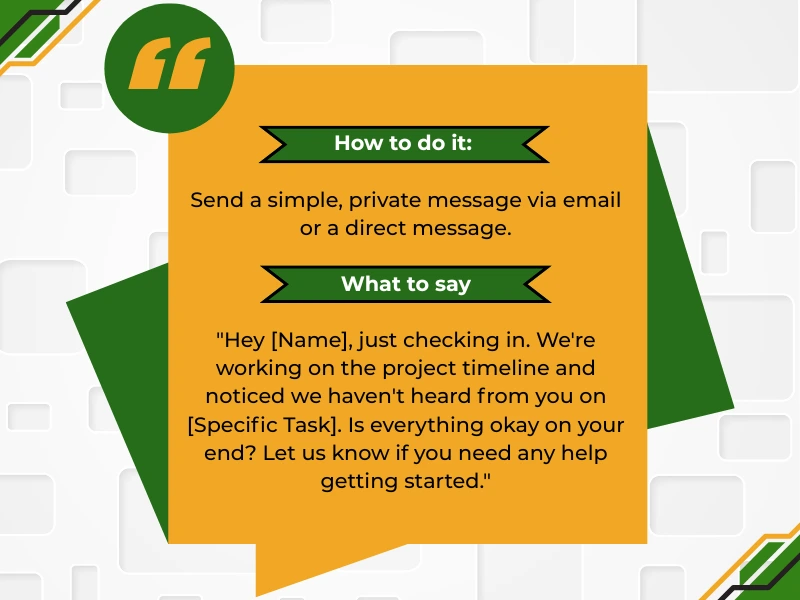
Before assuming the person is a “slacker,” reach out privately. Try to understand if there are any underlying issues. That group member may be facing personal issues, feeling overwhelmed, or simply be confused about the task. A hostile public call-out will only create a defensive reaction.
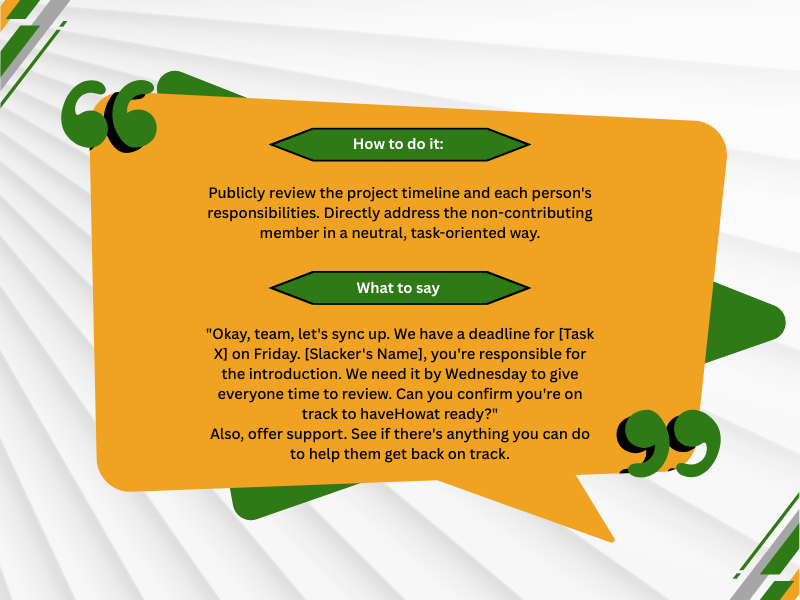
If a gentle check-in doesn’t work, bring the focus back to the team’s agreed-upon plan during your next group chat or meeting. Revisit group expectations. Remind the team member of their commitments. This makes it about the project, not a personal confrontation.
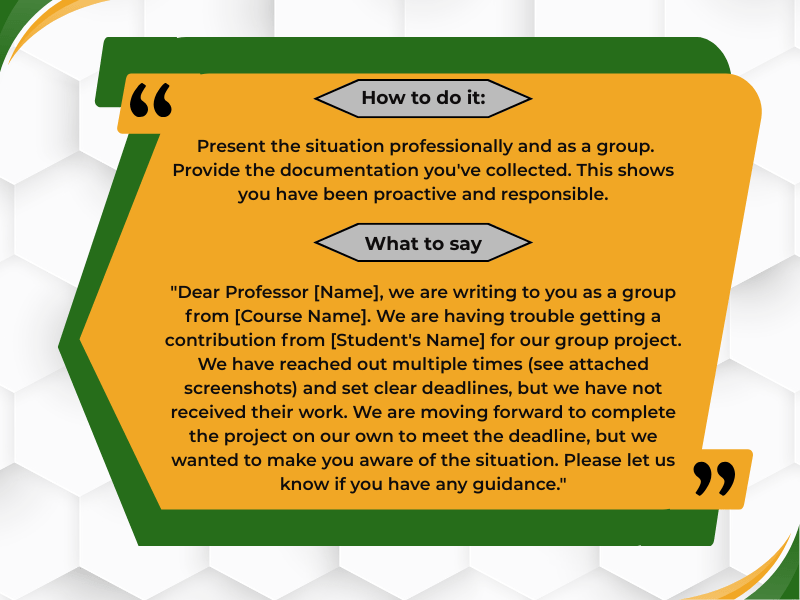
If there is still no progress, your group needs to prepare for two things: finishing the work without them and reporting the issue to the instructor. This requires documentation.
If the person has completely ghosted the group or missed the final internal deadline, it’s time to involve the professor.
Successfully navigating online discussions and group projects is a key component of online learning and a valuable type of learning for your future career.
By employing the effective online group strategies outlined in this guide, you can not only improve your grades but also develop essential skills in communication, group collaboration, and project management.
Embrace the opportunity to learn from your peers, contribute your unique perspective, and make the most of your online classroom experience.
With the right approach, you can turn any group project work into a rewarding and successful endeavor, ultimately enhancing your learning outcomes and preparing you for the collaborative workplaces of tomorrow.
There are many excellent platforms for virtual group collaboration. Google Workspace (Docs, Sheets, Slides), Microsoft 365, Trello, Asana, and Slack are all popular choices for online students. The best platform depends on the specific needs of your assignment and the preferences of your team projects.
Group projects in higher education, particularly in fields like distance education and other education program offerings, are designed to prepare individual students for the professional world. They mirror the professional practice of working in teams, managing deadlines, and resolving conflicts to solve complex problems.
When challenges arise, problem-solving becomes a critical technique. Problem-based learning approaches can be very effective. This involves identifying the problem, brainstorming solutions as a group, evaluating those solutions, and implementing the best one. Regular communication and a willingness to adapt are also crucial when facing unexpected hurdles in your online course.
Technology is the engine of modern online class assistance. It transforms the old, passive model of learning into a dynamic and highly personalized educational journey. By integrating sophisticated digital tools and AI, technology in online class assistance gives students powerful new support. They can master complex subjects, manage their workloads, and access expert help on demand. These innovations do more than just change how students learn; they also transform the learning experience. They are fundamentally reshaping education itself, making it more effective and accessible for everyone.
Virtual classroom tools are at the heart of the modern digital education experience. These platforms are far more than simple video conferencing software. They are comprehensive digital ecosystems designed to replicate and even enhance the traditional classroom.
Services like Zoom, Microsoft Teams, and Google Classroom have all evolved into interactive hubs. Their main function is to enable synchronous learning, where students and instructors meet in real-time. This includes live lectures, discussions, and Q&A sessions. However, their capabilities go much deeper.
In short, these tools form the essential technological backbone for online learning. They create a structured and highly interactive environment. By breaking down geographical barriers, they foster a truly cohesive classroom experience.
Perhaps the most groundbreaking development in online education technology is the integration of artificial intelligence. AI is moving education away from the traditional one-size-fits-all model. In its place, it offers a deeply personalized experience tailored to each student’s unique pace and learning style. AI accomplishes this by analyzing performance data and then adapting the educational content in real time.
The smart use of technology offers incredible leverage in education. However, it cannot fully replace the personalized guidance of a human expert. Some challenges require a human touch, especially when students feel stuck or overwhelmed. The tailored support students get from an expert can dramatically improve their learning outcomes. Recognizing when to seek this help is a critical skill, as software simply cannot replicate a human’s nuanced understanding.
Technology is excellent for answering “what” and “how,” but a human expert excels at explaining the crucial “why.” Seeking one-on-one assistance is often the key to true student success, especially in a few common scenarios:
For students facing the challenges listed above, knowing that professional online class help is available provides a critical safety net. These services are designed for situations that require more than just a quick software-based answer.
When the thought, “I just need someone to take my online class for me” arises from a genuine need to avoid falling behind, these platforms connect students with qualified tutors and subject matter experts. They provide strategic support that can range from handling online exams, classes, assignments, and quizzes to comprehensive assistance throughout a course, ensuring learners can meet their educational goals without being derailed by temporary obstacles.
The most advanced online tutoring technology today is evolving towards a powerful hybrid model that combines automation with human expertise. This approach creates a tiered support system that offers the best of both worlds. This blended approach ensures maximum efficiency and effectiveness, providing speed and agility. It’s all about empowerment, giving students the full range of resources they need to succeed on their terms.
You have an online class scheduled in an hour. Just when you sit down to attend the class, your internet goes off. Now, you will not get a recording of this live session, and the only way to learn the lesson is by attending the class.
This is a nightmare for students attending online classes. They get ready to attend the live session or sit for their online exam, and the technology fails.
Technical issues in online classes are common. But sitting with the problem will not be of any help. Instead, you need to find ways to fix the common online class technical issues. How to do that? Don’t worry, we have got your back.
This blog will take you through a few common technical issues every online student faces, along with their practical solutions.
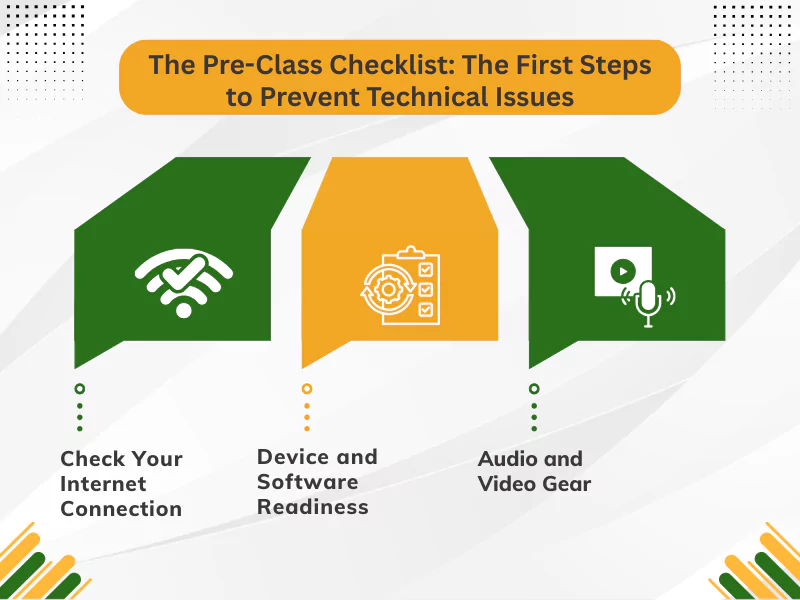
The first step to solving the technical issues is prevention. Yes, you read that right. Taking the necessary precautions before the class starts is probably the best way to tackle the technical issues. Here’s what you need to do:
First things first. Before you sit to attend the live session, you must check your internet connection. Weak or inconsistent connection is the root cause of all technical issues in online classes. This is what we suggest:
Ensure your computer and software are updated and compatible with the platform used for online classes for a smooth learning experience. We suggest these things for a better learning experience:
The next thing to check is the audio and video gear you will use during the online class. It is necessary to ensure you can both hear and be seen during the online class. Here’s what you should do:
These will help you address potential audio problems in virtual classes. It is always better to take precautions. We advise students working on online assignments or attending live sessions to follow the checklist for a better experience. You can also drop a ‘take my online class for me’ query for the right assistance.
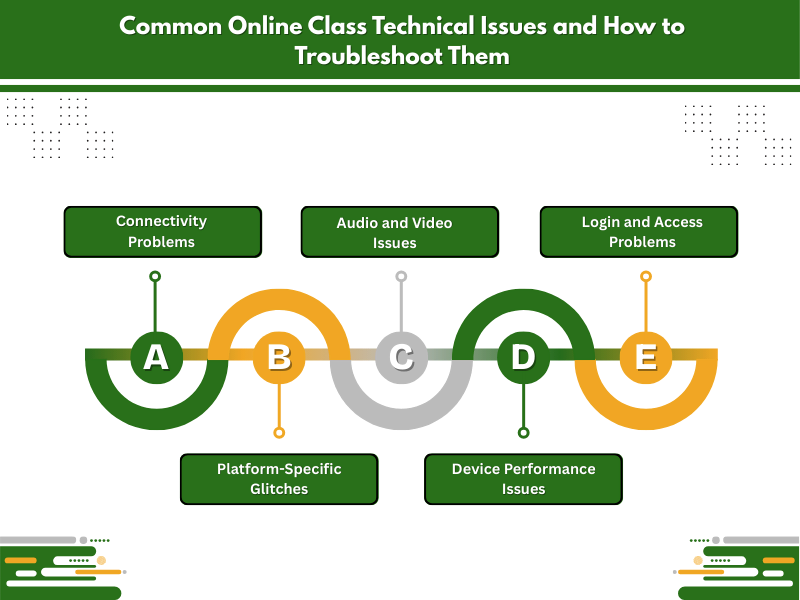
Virtual classes have made learning easy for all. However, when it comes to using technology in learning, you cannot ignore the common issues. Let’s take you through the common online class technical issues and a few ways to tackle them:
Frequent disconnections, slow loading times, and choppy audio/video are some of the major issues learners face while attending online classes. Weak Wi-Fi signals, limited bandwidth, and internet service provider issues are major reasons behind such online class connectivity issues.
These add up to the stress and anxiety, and do not let students stay productive during midterms and finals. While there’s no quick solution to it, you can use any of these methods to troubleshoot these issues:
‘Sir, I can’t hear you’ or ‘Why is your camera turned off?’ are some of the common questions in online education. In both these cases, neither you nor the instructor can be held responsible. These are actually some of the common technical issues in a distance learning environment. The reasons for such elearning problems can be incorrect settings, device permissions, or faulty hardware.
Here’s how you can troubleshoot these problems:
Not being able to log in, invalid credentials, or account being locked are three common technical issues in online learning. The reasons for these are equally common: putting in the incorrect username, forgetting password, and platform downtime. Here’s what you can do to solve these problems:
Problems faced by students with online learning platforms, LMS, are many. Starting from videos not working in online classes, Stay Productive During Midterms , to frozen interactive elements, the problems are endless. Browser compatibility, pop-up blockers, server issues, and outdated platforms are mainly the reasons for these problems. Here are a few ways to troubleshoot these issues:
The complaints about laptops running slow, applications freezing, or overheating are a few of the common challenges in online education. Most students complain about it without understanding the reasons behind it. If you have too many programs running, insufficient RAM, or outdated hardware, these problems are bound to happen. However, there are ways you can troubleshoot these issues, such as:
Navigating online courses is difficult if you face continuous technical issues. However, if you take the necessary precautions before the classes commence, you will be able to cope with the problems. You can also seek online class help if you lag behind others due to technical issues.
The advent of technology has made learning flexible and easy for both students and teachers. However, it would not be right to ignore the technical challenges faced by students in online education. To ensure a smooth learning experience, students need to find a way to overcome the challenges.
The troubleshooting methods are helpful, but we recommend that you tick all the boxes shared in the checklist before you attend your next live session to cope with future challenges.
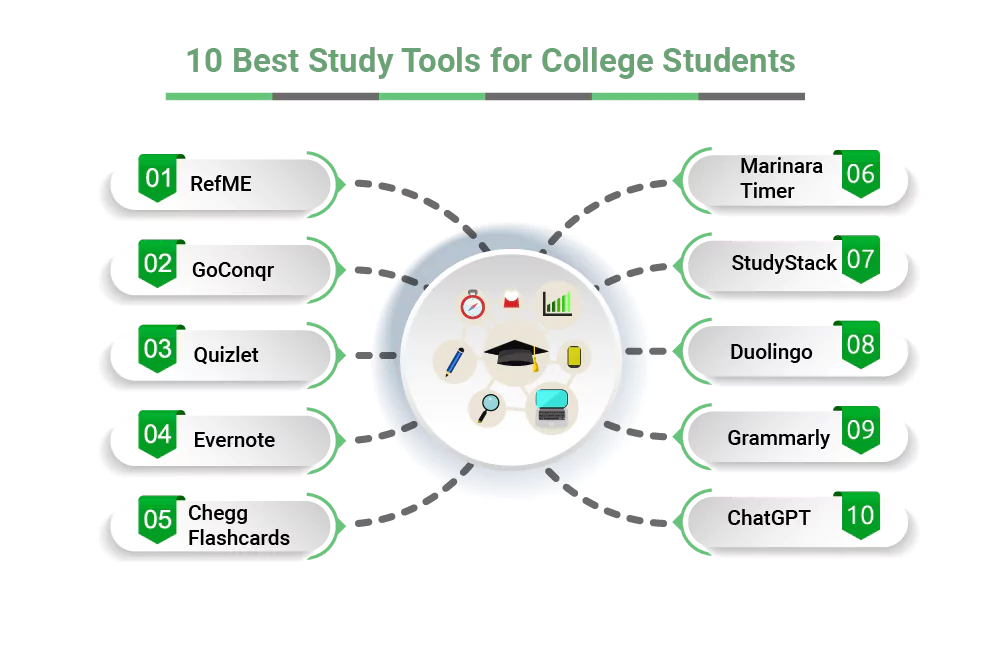
Have you been feeling frustrated with the notes lately? Did you turn your laptop into a library, and still, you cannot memorize anything? Are you waiting for a miracle that will suddenly transform your dropping grades into top scores? Then you should rejoice because this blog includes the 10 best study tools and apps for online learning that will not only smooth your note-taking process but also turn your online class challenges into wins.
But before you jump the bullet, bookmark it so you can come back whenever you need a quick reminder!
First, let’s check out the best apps for virtual classrooms:
If you are writing an essay or a case study and are unsure about the formatting or citation, then just scan the barcode of your textbook and get the assignment formatted in just a few minutes. Be it MLA, Chicago, or any other formatting and citation style, RefME is a free citation management app available on the web, iOS, and Android to help you impress your instructor.
If you are a visual learner, then GoConqr is for you. It has numerous tools and an app that integrates with Microsoft Teams and helps you learn and share within the Teams environment. This provides an all-in-one platform has note-taking features, mind mapping, flashcards, planner, and much more, offering a compehensive 306-degree learning environment. Therefore, if you wish to enhance your understanding and learning of a concept, this is the best find for you.
One of the best educational apps for online classes, Quizlet is your ultimate helping hand to generate flashcards, practice tests, quizzes, matching games, and even auditory tools. This free web and mobile app is one of the inventions of tech, as you can learn on the go, and that too in a fun and interactive way. Therefore, you can use Scatter and Space Race to increase your retention power and speed up your learning.
Did you know a March 2017 research conducted by Kaitlyn Mcglynn and Janey Kozlowski, said that Quizlet and StudyBlue are fantastic study tools to improve vocabulary at home?
If you set out on a path to discover the 10 best note-taking apps, then you will stumble on Evernote first. Honestly, this can easily be declared as a blessing for those students who need to take study notes during classes, but the speed of the class often makes it difficult. So, if you are a student who wants to clean up the mess and keep all notes, information, and research in one place, then behold the Godfather!
While getting Chegg answers costs $19.95 per month, this Chegg prep offer free flashcard service so you can learn quickly using 500 million flashcards available for free, which help students prepare for upcoming tests or weekly quizzes. Also, students get the chance to make their own sets of flashcards to find the best help they need!
No signup, no download, just a free web-based time management app ready to help you manage your time well. Based on the Pomodoro technique, this app helps you keep track of time and ensures you never miss a deadline, yet you take required breaks, helping to increase your productivity. Therefore, it will remind you after every 25 minutes to take a short break so that you do not burn out. Learn how to choose a college major to avoid burnout situations and study a subject that aligns with your interests.
Available for both iOS and Android platforms, this is a digital library of more than 500 million flashcards. You can also create and customize flashcards just like Chegg. Most college students use it to assess their knowledge and retention. So, to get your memorization power on track, definitely check out this free app now!
Well, Duo is here to help you learn a foreign language effortlessly and make your study sessions fun. Whether you are willing to watch Squid Games, wish to catch up with your French friends, or need to strengthen your Spanish game, this app is the ultimate saver. You can learn multiple languages that too, for free. It has spelling tests, little pronunciation tests, and streak rewards for studying every day! Thus, it’s time you maintain another streak!
Tired of those silly errors? Losing your head over the embarrassment of the spelling mistakes in projects or discussions? Then switch to the Grammarly app. Available on both iOS and Android, it helps you stay away from grammar, spelling, and punctuation mistakes. Furthermore, you can now check if your content is getting flagged for AI. Grammarly also flags plagiarized content, saving your assignment from getting rejected.
Since we are talking about student tech tools for studying, we need to talk about ChatGPT. There is no doubt that this online learning tool alone has revolutionized how students study. You do not need to spend hours skimming through thousands of books, study materials, or organizing your notes; all you need to do is ask a question and get an answer within a split second. It allows users to learn the material in a few minutes. Furthermore, it even generates multimedia to help students with projects. You can also upload notes from your desktop or phone, and get the notes digitized.
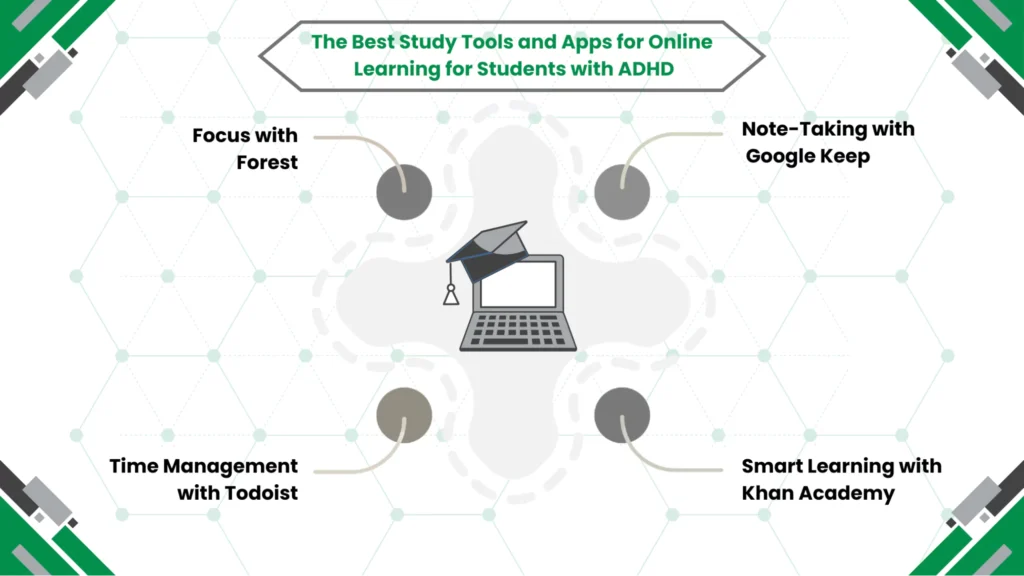
Moving on to the list of study apps for students with ADHD!
This gamified app makes academics fun and interactive, so you do not feel distracted. The more you stay away from the distractions and leave the app running, the more incentives you get! But guess what, if you get distracted and slide back to your phone, your tree will die. Thus, don’t let the tree die and concentrate on your study and move according to the planner or study schedule.
Available across all devices, your Google Drive keeps all your notes in one place. Thus, no need to worry about notes, even if you are out and have nothing bad your phone, you can get back to your coursework and complete your homework. No more excuses, folks!
This TrackingTime Browser Extension tracks your time. You get automated time sheets. So, now you can set reminders for due dates, just create a study schedule, and sync with Todoist. This time management tool will personalize itself and help you be on top of everything.
Need help with understanding complex concepts? No need to collaborate with friends, just watch videos and your very own tutor Khan Sir or his app to learn quickly. Whether you need an explanation for early K-12, college, you can access it to improve your conceptual understanding of grammar, science, history, and many more.
According to a survey of 200 high school teachers, 92% reported that they use Khan Academy to supplement their lesson plans, and 85% of them noticed improved student comprehension and test scores.
So, learn to start taking your online classes in 5 simple steps, and when you need help, just use any of the tools here!
Gone are the days of handwritten notes and unanswered questions; now you can manage notes and gain knowledge anytime and from anywhere. But that’s not all. Here’s what you get in this ed-tech world:
For various types of learners, educational technology has brought in various ways to learn. From a gamification-style of learning, a digital library with interactive e-books, videos, simulations, and built-in features like real-time feedback, students learn to be motivated and engaged without any external pressure. You can also learn how will AI change education going forward.
The tools may also offer additional help, like helping with workflow coordination and keeping things organized, so students can work on schoolwork anywhere and anytime. They can even tailor everything by adding their due dates. But if you need help with studies because of last-minute urgency, you can choose academic support services like take my class.
The apps can help you break your task into manageable parts and increase your understanding. Furthermore, with the geographical barrier broken, students do not have a standardized or set resource; online students, unlike offline ones, can access anything and everything available online and learn quickly.
The 10 best study tools and apps for online learning mentioned here are free versions and so you do not have to worry about your pocket. For teachers and parents, suggesting these tools to your kids and students will help you make their academics smoother and engaging, and also increase your productivity.
Best of luck!
Yes, indeed. There’s Focus, Freedom, Cold Turkey Blocker, SelfControl, and many more.
Khan Academy is one of the best apps which free to study. It is easy to get as all you need to do is search on Google.
While all the apps mentioned here are free, the most famous ones are Khan Academy, Quizlet, Duolingo, and SoloLearn.
While we can list a lot of famous apps like Quizlet, Anki, and StudySmarter, you need to understand, not all will work for you. So, try some of them and choose the one that works best for you.
Many students prefer using YPT – Study Group, Pomoroom – Group Study Room, My StudyRoom, and StudyStream for group study.
Well, there’s MyStudyLife, Athenify, Smart Timetable, and Study Bunny among many, which tell you to study!
The methods vary for each person. However, the overall effective techniques are active recall, spaced repetition, and interleaving.
The most popular apps that integrate well with LMSs are LearnWorlds, Docebo, iSpring Learn, and Litmos.
Purpose, planning, and consistency are the foundation for succeeding in your online class. As a result, from management skills to technical skills, online learning supports your professional development across every domain.
However, it’s also essential to know how to be successful in an online class for true online learning success. Doing so helps you use your time efficiently and focus on accurate, productive learning.
To help you get started, here are the best practices for succeeding in your online class that will set you up for success.
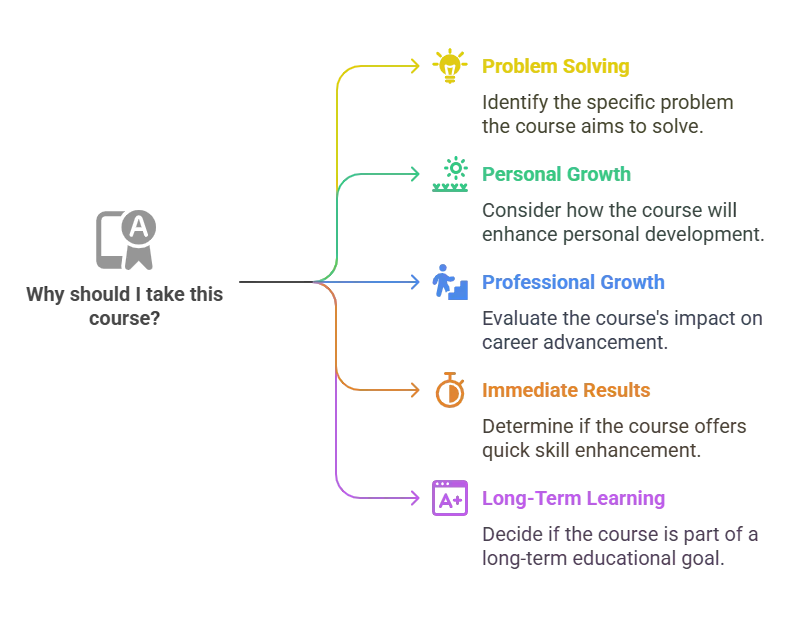
Start with a clear objective. First and foremost, know why you want to pursue the particular online course and what you want to achieve. Write your goals down and revisit them often. This keeps you focused and motivated.
Next, stay goal-oriented from the start. Along with this, always review the course syllabus at the start. It outlines what you’ll learn, assignment deadlines, and grading policies, helping you plan. Therefore, this is one of the foremost study tips for virtual classes.
Don’t worry—you’re not alone if you sometimes feel lost. Education experts recommend setting clear goals to stay on track.
Have a quiet space for your study session. To begin with, keep it clean and comfortable to help you focus better.
In addition, add items like a lamp, chair, and desk to make your space more efficient. Avoid noisy areas. If possible, use noise-cancellation headphones whenever attending live online sessions.
As a result, a stable environment reduces distraction and makes you feel like you’re in a traditional classroom.
Make a schedule and follow it daily. This helps you use your time wisely. For better planning, use digital tools or a wall calendar to plan your week. Include breaks and free time too.
However, if your schedule gets too hectic, you can look for professional online class help services. In such cases, you can take their services by asking to take my online class for me.
Good time management helps you finish work on time and avoid a last-minute rush.
One of the best time management tips for online class for students, to do this effectively, break work into smaller parts and use timers to stick to your plan. Overall, this is one of the top tips for managing time in online education.
In fact, managing time well is often the deciding factor between success and struggle in virtual learning.
To help you further, you can also apply the following time management methods:
As per this method, you study for 25 minutes without a break. Then take a 5-minute break. After completing four rounds like this, you can take a longer break to rest your mind.
Here is how the Pomodoro Technique works:
The benefits of the Pomodoro Technique are:
Use this Eisenhower matrix to distinguish urgent vs important tasks. With this method, you start each day with a to-do list. Here, you focus on the most important part first. Want to try it yourself? Download a free Eisenhower Matrix template PDF or use a printable version to get started!
Always focus on one task rather than switching between tasks. In this way, you can learn faster and make fewer mistakes. Therefore, finish one task before starting another. This improves quality and reduces stress. In short, this is a key to time management for online students.
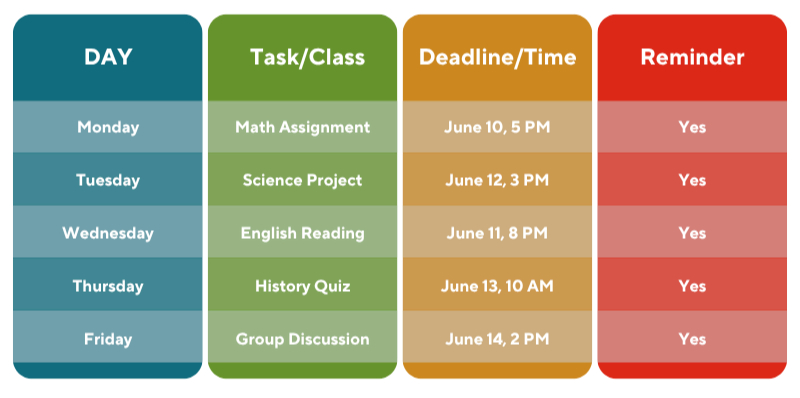
To begin with, use a calendar to keep track of your classes’ schedules and deadlines. It will help you stay on top of your work.
For better organization, color-code events for clarity. Check it every morning to plan your day efficiently.
To avoid last-minute pressure, you can set reminders for assignment submission dates.
Apps like Google Calendar or Notion can make this process much easier. You should try them to keep everything organized and accessible from any device.
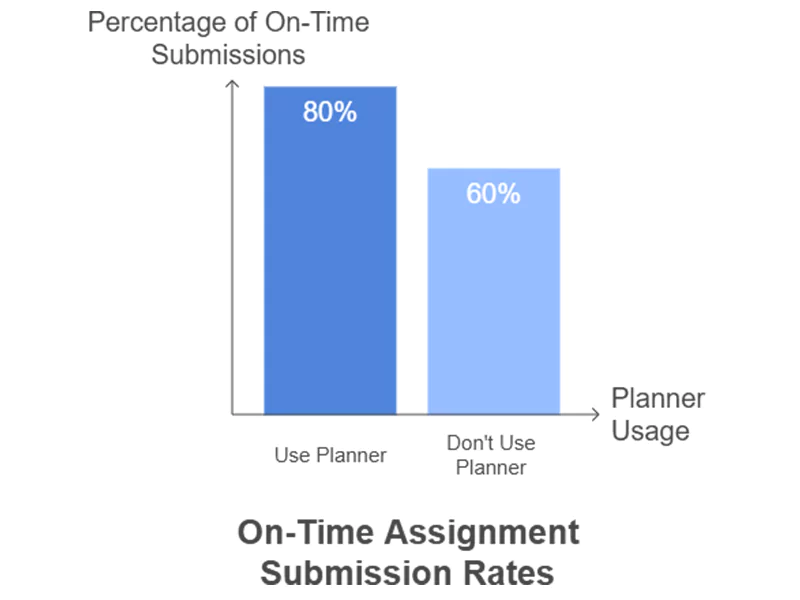
Don’t you think it’s awesome to see your tasks with planners and color-coded schedules? According to online learning experts, it helps your brain retain deadlines and reduces last-minute stress.
The bar graph below shows how students who use planners or calendars tend to submit assignments on time more often than those who don’t.
First, log in to your platform often. This will keep you updated and involved. Moreover, frequent login helps you catch up on announcements. You’ll also see new resources on time. As a result, active login supports better participation and engagement. This will also help you avoid one of the major technical issues.
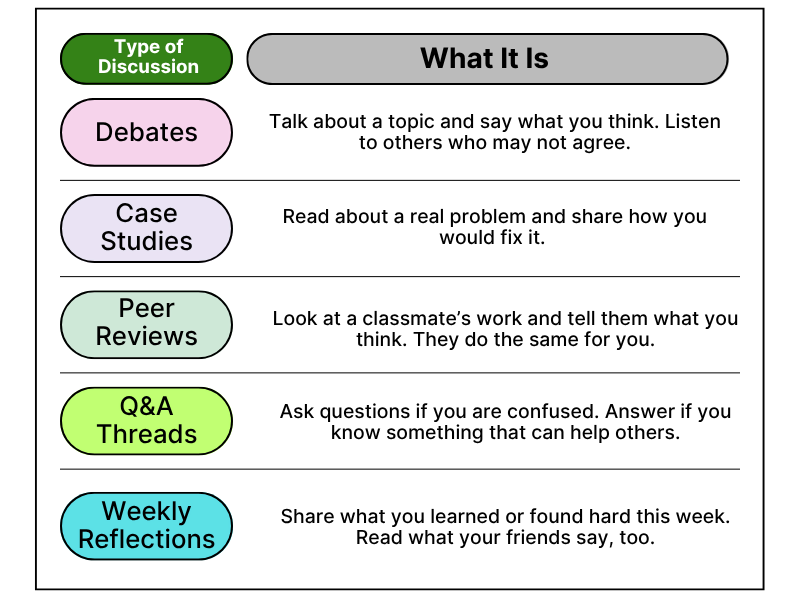
Don’t just sit on the sidelines; get into the online discussions and group projects. Join in conversations with your classmates, ask follow-up questions, and share your ideas. This is one of the best online class participation tips that helps you learn better.
Additionally, you make new friends and gain new insights. The more you engage, the more likely you are to be successful in online classes.
Many students say active participation led to valuable friendships and a better understanding of tough topics. So, don’t hesitate to join the discussion.
Here are some types of discussions you must do:
Always remember to never be afraid to ask questions to your instructor. It clears doubts and makes learning easier. Moreover, if something is unclear, speak up early. Your instructor is there to answer your questions and support your success.
Therefore, stay in touch with the course faculty and don’t hesitate to ask any questions you might have at any stage.
Furthermore, writing notes helps you remember what you have learned in your online course. For clarity, use bullet points or diagrams. Please review them before tests or quizzes for better results. In fact, handwritten notes can enhance learning and understanding.
Try digital note-taking apps like OneNote or GoodNotes, or stick to classic pen and paper. Please find what works best for you.
To begin with, keep all your files, notes, and books in order. This makes your learning experience smoother. For example, use folders on your device or binders for paper notes. Label everything clearly. As a result, organized material supports online learners during exams.
Next, try using an app to take notes. It supports better focus. Additionally, explore productivity apps to manage your tasks. Set timers to stay on track. Also, ensure your technical requirements are met for smooth class operation.
Some top-rated tools for online learners include Notion for organization, Forest for focus, and Google Keep for quick notes.
If needed, ask your college about accommodation options. These can include extra time on tests, special software, or captioned videos to help you succeed in your online class.
First of all, turn off social media notifications so you don’t get distracted while studying. Additionally, use apps that block social sites. Keep your phone out of reach during class time.
By staying mindful, you can avoid getting distracted easily.
Furthermore, please review your lessons regularly. Do not procrastinate. This practice helps with long-term memory and better understanding. Make a habit of short weekly reviews.
This will help you prepare for exams stress-free, and consistent reviews will also help you during your exam.
Moreover, short breaks during your coursework keep your mind fresh and active. Stretch or walk for a few minutes. Importantly, avoid screens during your break. Ultimately, breaks keep you mentally fit for online learning.
You can do one thing to help. Try a 10-minute workout between classes or go outside for fresh air. These small breaks can significantly affect your energy level and focus.
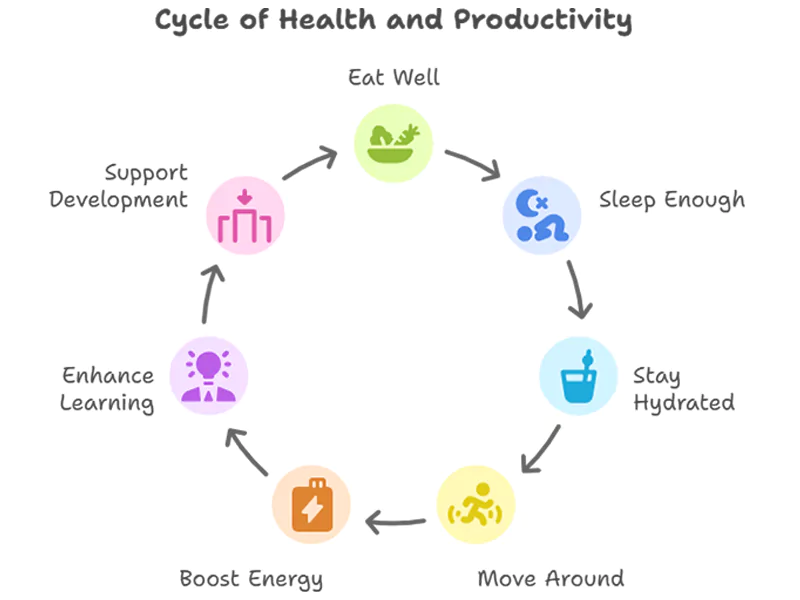
To maintain energy, eat well, sleep enough, and move around. This keeps you energized for productive learning.
Additionally, stay hydrated. Drink a glass of water in short intervals, and exercise regularly. You can include a 10—to 15-minute walk and even yoga in your daily routine. A healthy body equals a healthy mind, which boosts personal and professional development. This is also one of the best mental health tips for remote learners.
Furthermore, talk to your peer group or classmates remotely. Sharing tips can be helpful. Start group chats or study groups. Helping others can also help you learn. Ultimately, make meaningful connections just like in an in-person setting.
Never hesitate to contact your peers. Many top online learners say joining a study group or chat helps them stay motivated and accountable.
First, explore helpful resources like videos, articles, and extra materials provided on the platform. Next, bookmark the best ones for quick access. Don’t hesitate to use school libraries online. Overall, use what’s available in your online program for better results. Check out the National Center for Education Statistics for trustworthy information about online learning.
It is the major government agency that collects and provides reliable data to help students and parents understand trends in online learning, compare programs, and make smart decisions using reliable information.
For expert advice, consult educational psychologists or online learning specialists, who often share free guides and webinars.
Here are the Quick Facts About Online Learning:
Find ways to motivate yourself. Reward small wins to stay excited about learning. Visualize your long-term goals often. This builds strong commitment. Track your success in each semester to remain on the right path.
Additionally, check how much you have completed and what is pending. This will help you complete your assignments on time. You can use charts or lists to measure your progress. Moreover, celebrate the moments when you complete the assignment within the prescribed time. This will help you stay motivated. Mark your due dates and keep track of quizzes and other tasks.
After tips for online classes, it’s important to understand your learning style.
Did you know that Online class vs self-study is a common dilemma for students?
Online classes offer structure, guidance, and interaction, whereas self-study allows flexibility and self-paced learning.
Ultimately, the best type depends on your goals, discipline, and learning mindset. In many cases, a balanced mix of both delivers the best results. Suppose you are looking for career advancement programs. In that case, an online degree (Bachelor’s, Master’s, MBA) and online certificate programs can help you succeed in your career and are recognized by many employers today.
In conclusion, the “succeeding in your online class tips” that we have read in the blog show that using simple strategies, such as making a study plan, joining discussions, and staying organized, can help you do well in your online classes. Following these tips can make your learning experience easier and more successful.
Online classes are the most convenient way to get an education. They have many benefits, making them a good choice for students and teachers. For students, online classes provide convenience, flexibility, and easy access. Students learn when they want to and at their own pace.
Starting online classes can be an exciting yet confusing experience. But with some help, you can easily begin your online learning journey. Let’s read the five actionable steps to help you start your online classes, choose the right online course, and learn in the best way possible.
With the right approach, you can enjoy learning from home and study well. Let’s explore everything you need to learn how to start online classes at home.
You can also set SMART goals, as it can make a big difference when deciding to choose an online course.
Let’s take some examples:
Besides, creating a simple roadmap and visualizing your career progress greatly motivates you. This can also help you choose a college major.
Look, every learner has a unique learning style. Some learn through live online classes (synchronous), pre-recorded short video lectures, audio lessons (podcasts), interactive exercises and quizzes, reading materials, discussion forums, live webinars, boot camps, hybrid models, or hands-on projects. This will also help you stay productive during midterms and finals.
Thus, always take quality time to search for an online course that suits your learning format. If you take the format of your choice, it will help you stay focused during online classes and consistent throughout the course, making it effective and enjoyable.
In case you want to take an online course for academic purposes and that too to earn college credits, first check that the course you are choosing offers transferable credits or not. Because many online classes do not offer transferable credits. So, contact your academic advisor at your college or university to ensure that the credits will count toward your degree requirements. The course should be accredited and recognized by your institution.
To make this clearer, consider this situation:
Suppose you are an English major aiming to earn 100 credits to graduate. Thus, taking an accredited online course related to your course topic can help you earn transferable credits that count toward your degree requirements. For example, you can take a Creative Writing course from an accredited course platform. It will bring you closer to your graduation goal.
Before taking your preferrable online course, always take time to read reviews about the instructor and the course creators. Previous students must have given the related reviews.
If the instructor is good, it will make all the difference in online education. Honest reviews from former learners tell you about the instructor’s teaching technique and quality, knowledge, responsiveness, and overall expertise. Testimonials can also tell you about the quality of course materials. So, accordingly, make your decision.
You can visit websites like RateMyProfessors, Reddit, or official university pages to read and post student reviews about instructors. These platforms let students share their experiences and rate professors to help others make informed decisions.
When you take online classes, it does not mean that you have to go through the course all alone. Even in a virtual classroom setup, support matters. Before enrolling, check what academic or technical support is available with the course platform. Identify if a discussion forum, peer study groups, tutor access, or 24/7 tech support is available.
When you connect with your classmates and mentors, it can make learning more interactive and manageable. You can ask for feedback on your assignments and worksheets.
Sometimes, online classes can feel challenging. Due to work or personal commitments, you may not have enough time to complete your coursework. Or you may find the course content hard to understand, especially in remote learning.
If it’s your first online course, you might need step-by-step guidance. In such cases, you can ask for professional help. Many online class help services are available where you can ask a professional to take my online class for me.
To create an online learning experience more effectively, Teachers play a crucial role.
Let’s shift to the teacher’s perspective:
As an educator, how do you take online classes?
Here are some essential steps to begin online classes that help you learn how to create an online course and make your online classes impactful:
Educators play a significant role in online learning. With the right approach, it’s never been easier to create meaningful and interactive virtual classrooms that truly help students achieve their learning goals from the comfort of their homes. Want to start your course creation process or looking to scale an existing online class?
Every student has a different learning style. To make your course dynamic and interactive, use a mix of formats, such as short videos, animations, infographics, and interactive quizzes.
These are the Best Study Tools and Apps for Online Learning that you need to match with different learning styles and keep your students engaged.
You can use the best channels like YouTube, mobile apps to host your videos and make your content easily accessible and shareable.
A well-structured outline provides direction and sets clear learning outcomes. Clearly defining the course title and identifying the types of courses you’re offering helps create focus. Break content into bite-sized modules and lessons that start with foundational concepts and build on previous knowledge. It will make it easy for learners to apply what they’ve learned.
This type of structure will help you to deliver your course effectively. It also provides students with clarity and consistency. Make sure your course page reflects this structure and is easy for students to access and navigate.
Keep your potential students active through quizzes, question and answer rounds, discussions, and group projects. Such interactive activities help them achieve a sense of community on the Thinkfic platform and others too.
From start to finish, define your course objectives, deadlines, and participation rules. This expectation supports students to learn more efficiently and stay on track.
If you give students frequent and constructive feedback, it keeps students aware of their learning progress. One-on-one support also adds value and builds trust.
Combine live sessions for real-time connection with self-paced materials. Many times, students want to learn at their own pace. This kind of hybrid model reflects modern remote education techniques, giving flexibility without eliminating interaction.
When you market your course, tailor your messaging to your target audience. Understanding their needs ensures your content is related to your topic and delivers value they truly care about.
Designing a course on your niche that solves a specific problem or fills a knowledge gap is a good idea. People will pay for this.
You can use marketing tools, such as email campaigns, landing pages, and social media sharing features, to enhance visibility and enrollments.
Avoid setting your pricing too low, which can undervalue your course, or pricing too high, which may stop potential buyers. Research competitor pricing and use value-based pricing to show the outcomes your learners will get.
You can offer advanced modules or related workshops to the students who completed your course.
By taking real views about the course from the old students reflects your course genuineness to the prospective students.
A well-timed discount can boost enrollments, especially when launching or promoting your course.
Stay updated with the latest information, new worksheet designs, and best practices going on in the education industry. This will make your course updated.
Considering the above strategies, you can design a course that educates, inspires, and truly changes your students’ lives.
Nonetheless, students, start your online learning journey with clarity and confidence by following the simple steps mentioned in the blog while choosing the right course for your goals. Teachers, design and deliver your course with structure and engagement to give students a meaningful and accessible learning experience.
Disclaimer : BoostMyGrade.com offers academic assistance through model papers and study materials for research and learning support. These materials are intended as examples and should not be submitted as original work. We do not support plagiarism, academic dishonesty, or violations of institutional policies.