Call Us 1-860-566-8448 / Email support@boostmygrades.com

Have you ever felt that your grades don’t match the performance during exams? Well, you are not alone. Numerous students face this in online classes. The reason is that they are completely unaware of how online classes are graded. 

If you are of the idea that your grades only depend on how you do in the exams, you are absolutely mistaken. In fact, students are graded based on automated quizzes, discussion board engagement, proctored exams, project-based assessments, and more. 

Here, we will take you through the ways the classes are graded that you don’t know about.
Key Takeaways

  • Grades depend on more than just exams
  • Participation and logins are tracked
  • Discussion posts impact scores
  • Small tasks and quizzes matter
  • Projects and assignments carry weight
  • Late submissions can hurt grades
  • Consistency affects overall performance
  • You can control grades with regular effort

A Guide on How Online Classes Are Graded

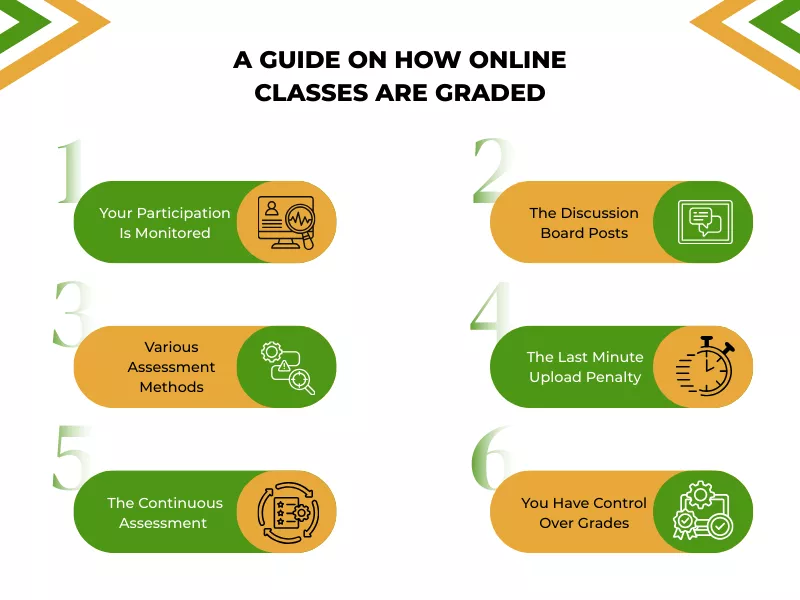
Infographic explaining how online classes are graded with key assessment factors and tips

In online classes, your grades depend on a lot of things other than the quizzes, tests, and exams. Let’s take you through the things that you come across in your classes, but don’t know how they also play an important role in your overall grades: 

A. Your Participation Is Monitored

Believe it or not, your participation in online classes is monitored, and that might affect your grades. The difference between online and in-person classes is that your professor will not know if you are logging in and studying the lessons. 

However, the professors can track your daily login and participation in online classes, and that plays a major role in your overall grades. In fact, the do my online class experts always talk about how students need to stay active in the classes to get good grades. 

B. The Discussion Board Posts

A common misperception in online courses is that participating in discussion boards is optional. Most of you often ignore posting on them. What you don’t know is that these posts actually have a major role in your overall grades. 

Professors often assess the quality of interaction to understand your engagement and grade you on that. While you cannot ignore the common online class technical issues, you need to take the necessary steps to solve the problems and ensure your participation does not get hampered.  

C. Various Assessment Methods

The online class grading system, as you have already understood, does not depend only on the Big Three (midterm, final, and term paper). In fact, your grades often rely on electronic portfolios, video clips, and group projects. 

Therefore, a student’s final grade depends on how well they do in everything, not only in tests. So, if you see that your grades are lower, look for all the aspects where you fell behind. Talk to your professor to understand the various things and start working on them to improve your grades. 

D. The Last Minute Upload Penalty

Many students feel that submitting an assignment even a minute before the deadline is safe. Well, it’s not. If you know how professors grade online classes, you will never make this mistake.  

Constant last-minute submissions indicate poor time management skills and change how your professor perceives your seriousness, and consequently affect your grades. It is, therefore, recommended that you aim for a 24-hour buffer for assignment submission. 

E. The Continuous Assessment

In online college courses or any other online courses, you are always being assessed. The stats that you see about your progress on the platform play a major role in your assessment. In fact, this has almost replaced the high-stakes final exam. 

The problem is that students often ignore the small tasks, like multiple choice questions, and others. They assess the performance trend to understand your mastery and grade you accordingly. Therefore, you need to focus on everything you come across during your online courses. 

F. You Have Control Over Grades

This is the silver lining for students. You have control over your grades. Sounds strange? Well, if you look at the ways you are graded, you will understand that you can keep it in control from the beginning. The online education process allows you to focus on all the things and improve your grades. 

As mentioned earlier, everything that you come across in online classes contributes to your final grades. Therefore, when you start your journey, you can stay on top of all of them and maintain consistent grades throughout. 

That being said, you also need to know the best ways to stay on track and focus on your studies. Let’s take you through a few tips to ensure you don’t lag when it comes to grades.

Tips to Stay on Track in Online Classes

You need to create an effective online learning environment, that’s non-negotiable. Apart from that, you need to do a few more things to ensure you never lose track. Here are a few things you can do: 

  • Log in to your LMS and spend at least 10 minutes every day. Read an article or check a forum when you visit the platform. This will help you keep the engagement score high. Do not open it only on Sundays; it will seem like a procrastination risk to the AI and will lead to closer human scrutiny. 
  • Use Google Docs or other cloud-based software from the beginning. This will help your teachers understand how much time you have spent on the project. Also, it avoids the risk of being suspected of AI usage. 
  • Stay active on the discussion forum. This is probably one of the secrets of online grading. Post your message early in the week, and respond to others 24-48 hours later. Students who post everything in 30 minutes will be prone to getting lower collaboration scores than those who have a distributed approach throughout the week. 
  • Work on your assignment, complete and submit it well before the deadline. Take help from the online class experts to keep track of all the things. 

Final Thoughts,

What students don’t know about online grading is that the final exams are just a piece of a bigger picture. They need to stay on track with all the aspects of online classes to achieve good grades. 

While the online exam grading process depends on the answers you provide during the exam, you need to know that the final grades depend on how well you did in all aspects. Therefore, do not ignore any part of your online course if you want to achieve good grades. 

Frequently Asked Questions

1. How does an instructor verify that I actually wrote my essay?

In higher education, instructors review the metadata and Total Editing Time of your essay. If a complex paper has a two-minute editing history, it may drop your grade or trigger an academic integrity review, as it suggests the material was copied or AI-generated.

2. Can my weekly login habits affect my final degree points?

Yes. Many online programs use algorithms that count your weekly frequency of access. Even if your math or science answers are correct, an instructor might reduce your participation score if you only connect to the portal on the day an assignment is due.

3. Do group projects have hidden individual requirements?

Typically, yes. While students work together, systems track individual Contribution Heatmaps. If you prefer to work offline and only add the final format at the end, the instructor sees zero activity from you, which can drop your individual point total significantly. These are some of the hidden facts online class grades.

4. What happens if I have trouble with the computer or the internet?

Online students must be careful; technical concern is rarely an excuse. Most college level policies require a 24-hour buffer. If you email the instructor at the deadline with a problem, they may hide the submission link or apply a late count penalty.

5. Why is the grading rubric so focused on additional resources?

To teach students to go beyond the basics, many online programs use a rubric that awards points for accessing additional library links. The system tracks if you open these files; if you don’t, you may miss the key Engagement points needed for a graduate-level grade.

6. Do shorter micro-tasks really matter for my semester grade?

Absolutely. In community college and university settings, continuous assessment (like weekly polls or quizzes) has largely replaced high-stakes finals. If you ignore these small items, the performance trend will confirm a lack of mastery and prevent you from reaching top-tier enrollment honors.

7. What grading scale do most online classes use?

Most online classes use a standard letter grading scale: A (90–100%), B (80–89%), C (70–79%), D (60–69%), and F (below 60%). Some courses also use weighted or points-based systems depending on the structure.

8. How are online classes graded differently from in-person classes?

Online classes are graded more continuously and based on multiple activities, unlike in-person classes that rely more on exams. They include participation tracking (logins, activity), discussion posts, quizzes, assignments, and projects. In contrast, in-person grading often focuses more on exams, attendance, and occasional assignments.

While they say, ‘failure is the pillar to success, the panic that follows when you know you’re failing an online class cannot be avoided. However, you have a few options to take control of the situation, starting with talking with your professor and consulting your academic advisor. 

We understand the stress of failing a class, and we also know the consequences that you will have to face if you fail. Therefore, to help you deal with such situations, we have prepared a list of options that you can use when you are failing. 

Let’s learn all about them in detail!

Key Takeaways

  • Review your grades and identify why you’re falling behind.
  • Contact your instructor early for guidance or possible grade recovery options.
  • Use online resources or expert help to manage coursework and tests.
  • Focus on high-weight assignments to improve your overall grade faster.
  • Failing a class can lead to lower GPA, financial aid issues, and delayed graduation.
  • Taking quick action can help you recover and pass the course.

The Things to Do When You’re Failing an Online Class

The online learning environment provides a few options to students who are on the verge of failing an online class. One of the best ways is to hire online class help experts and get the necessary help from them to improve your grades. In addition to that, here are a few helpful options if failing online class:

A. Do an Audit

Before you call or message anyone for help, take a breath, relax, and do a complete audit. This will help you understand where you stand in your online course. You need to do two things here: 

  • Find out the difference in points and how much you need to pass the class. This will help you set a clear target and prepare for the upcoming tests. 
  • Next, you need to understand the reasons behind the drop in grades and the current situation. In online learning, it can be anything from common online class technical issues to the difficulty level of online college courses. This prevents you from making the same mistake twice. 

B. Talk to Your Instructor Immediately

It is highly recommended that you don’t wait till the last minute to contact your instructor. When you get the feeling that you are on the verge of failing the class, contact your professor immediately. 

In most cases, professors are lenient toward those who take accountability and reach out early. Be submissive about your present condition and ask for advice or suggestions to pass the course by earning extra credit or making up for missed work. 

Also, you can specifically ask them if they can reopen a missed quiz or accept late submissions for partial grades. This might be a way on how to pass failing online class. 

C. Make Use of Virtual Resources and Online Communities

Being behind the screen does not push you back. You have a lot of resources around you to help you overcome the odds. First, seek help from an expert and request them to ‘take my test for me’ to improve your grades. 

Additionally, go through the discussion boards on online communities. You might find similar questions that you are struggling with, posted by other students. This helps you get the answers or take it up with an expert or your professor. 

Be present in online college classes. Showing yourself helps the professor recognize you and think about a solution instead of putting your request away. This was not a problem in traditional classrooms, but not showing up in classes might hamper online learning experiences. 

D. Filter Out the Right Assignments

At this point of your course, do not make the mistake of choosing an assignment that carries less weight. Instead, use the high-impact method to catch up on online class grades. It is recommended that you focus on tasks that can save you from failing grades. 

There are times when students feel overwhelmed. In such cases, students could submit something on time. Always remember, submitting something on time will keep you in the game over submitting nothing. Even if it’s a mediocre paper, submit it on time. 

E. Adjust Your Online Learning Environment

The online learning environment plays a pivotal role in the entire situation. Try being in a work-only zone. Procrastination is a major challenge in online learning. Unlike in-person classes, online education does not allow you to talk directly to your teacher. This often leads to the ‘I’ll do it later’ trap. 

Setting up an effective online learning environment helps you concentrate and study hard to make up for the lost grades and get to a passing GPA. 

These can save you from failing online degree programs. However, if you are of the mindset of not following all the rules and going with the flow, you must know about the consequences before ignoring the methods. 

What Are the Consequences of Failing Online Classes?

Infographic showing consequences of failing an online class including GPA drop and delayed graduation

You can face severe consequences if you fail in an online class. Many students do not understand these and hope that they can make this up in the next tests. But that is difficult. The following are what happens if you fail online class: 

A. GPA Reduction

Getting an F in your online classes contributes no points to your overall GPA. So, even if your GPA has been consistent for the last few exams, it will be negatively affected. This drop can result in academic probation or even dismissal from certain programs in a few courses.  

B. Impact on Financial Aid

Numerous financial aid programs require students to maintain a certain GPA. Failing grades can cause it to drop, which might lead to losing the financial aid. This is a serious problem for students who completely rely on such aids for education in online schools and colleges. 

C. Retakes

Failing a class that is pivotal for your major will require a retake. While that’s good news, the rules for retakes are not the same for all schools and colleges. In some schools, the grade you get when you retake the test is taken into consideration. If you score really well in the test, your GPA will improve significantly. 

However, in some cases, institutions combine both the failing grade and the new grade. As a consequence, it has a moderate impact on your overall GPA. 

D. Delayed Graduation

Delayed graduation is one of the immediate consequences of failing a class. This is often evident in challenging online courses like nursing degrees.You will not be able to graduate until you pass all the courses. Therefore, if you fail, it would only mean investing more time and more money to take additional classes. 

E. Potential Dismissal

Failing multiple classes or high-credit courses can lead to academic dismissal. The dismissal will mean that you can no longer study in the college or university. Needless to say, this will have a significant impact on your career and educational goals. 

An online student needs to understand what failed classes can lead to. To save yourself from all this trouble, it is wise that you hire an expert to get help with online class. They can help you maintain your grades and prevent you from failing any of the classes. 

To End with,

The best thing about the whole situation is that you can take a step before things get out of hand. When you understand that the chances of failing are high, take steps to ensure you improve your grades to meet the passing criteria and avoid the consequences. 

Use online resources, hire an expert, and stay in touch with your instructors and classmates to get the necessary help. With proper planning, you can achieve the passing grade and complete your course on the expected time. 

Frequently Asked Questions

1. How do I recover if I am failing online college classes?

If you’re failing, the first thing to do is make a plan to catch up on the coursework. You need to understand where you are falling behind, whether it is with the learning management systems or any other particular course. Finding that will help you make a plan to get the passing grade. 

2. Do the University of Phoenix or other online schools allow grade replacement for failed classes?

Most online universities allow undergraduate students to retake a course to earn a new grade. So, you can request one if you have failed a class. 

3. How does the Pace of Completion rule affect my financial aid if I fail?

Even if you have a passing grade in other units, failing a class affects your Pace. Financial aid usually requires students taking online college classes to finish at least 67% of their total coursework. If you fall behind this percentage, services are available through the financial aid office to help you make a plan for a Financial Aid Appeal.

4. What if I am failing multiple online classes?

Failing multiple classes can lead to academic probation, suspension of financial aid, and a lower GPA. Taking immediate steps like contacting your instructor, meeting an academic advisor, or hiring an online class help expert can help you recover the lost grades.

To provide secure online class login access, enable multi-factor authentication, avoid using public Wi-Fi, and never share your credentials with strangers. These three steps block the majority of account breaches before they happen.

If you are looking to hire someone to take your online classes, make sure their website is HTTPS verified so that you can focus on coursework while they manage these safety habits in place. In this blog, you will learn the tips on how to secure online class login.

Key Takeaways

  • Your master key is your school email. It has the ability to reformat all other accounts that you hold. Secure it using a special password and MFA first.
  • Password Manager eliminates the largest pretext for weak passwords. It is no longer necessary to remember complex credentials, but only a strong master password. Store all the information in Bitwarden or 1Password.
  • The two most risky areas among the students are the Public Wi-Fi and shared mobile devices. It is always good to make sure that shared computers are fully logged out and do not log in to vulnerable accounts on open networks without using a VPN.
  • Slow down before you click. The majority of phishing attacks are successful due to the fact that students are in a hurry and are quick to act.
  • A single account check by looking at the sender address and URL may stop a complete account compromise. Security is a habit and not a one-time remedy.
  • The 15-minute review at the beginning of every semester, passwords, permissions, MFA, and sharing settings will keep your protection up to date without occupying your time.

Is Online Class Login Safe to Share?

Every learning platform you sign up for holds a piece of your identity: your name, email, location, academic records, and sometimes payment details.

When attackers target students, they are not going for one account. They want access to everything connected to it.

Students are attractive targets because they:

Infographic showing the importance of online security for students, including juggling between multiple platforms.

A single weak link can expose your financial aid portal, student email, cloud files, and class submissions all at once. The good news is that most of these risks are preventable when you choose a professional class taker that do not take much time.

Why Student Data Is a Common Target?

Academic accounts are more valuable than most students realize:

Infographic showing 3 reasons why student data is a common target.

Attackers also know that students feel pressure. A fake email warning that your account will be locked right before an exam pushes people to click without thinking. Cybercriminals use that urgency against you. When you hire a professional to take your online class, know these things to be safe. 

Here is a quick look at what is most commonly targeted and what an attacker can do with it:

Data TypeWhere It LivesRisk if Exposed
Login credentialsLMS, email, student portalFull account takeover
Student ID numberProfile pages, documentsIdentity fraud
Payment or financial aid infoSchool billing systemsFinancial theft
Assignment fileCloud storage, submissionsAcademic impersonation
Location and device dataApps and learning toolsTracking and profiling

Knowing what you are protecting makes it easier to stay motivated about protecting it. Taking help with online class gives an insight and peace of mind to manage these activities. 

Build a Strong Password and Secure Online Class Login Routine

Your password is the front door to your academic life. A weak one is like leaving the door unlocked.

The safe way to login to online class account, start with your three most critical accounts:

  • Your school email
  • Your student portal
  • Your learning management system (LMS)

These three can reset everything else, so they need the strongest protection first.

Use passphrases rather than single words with symbols. Something like “BlueCoffeeMugMonday7” is both long and memorable. Avoid anything tied to your name, birthday, or school name.

Follow this checklist to build a solid secure student login access routine:

  • Use at least 14 characters for every academic account password
  • Never reuse the same password across your school portal, email, and class platforms
  • Store all credentials in a trusted password manager like Bitwarden or 1Password
  • Enable multi-factor authentication on every platform that supports it
  • Delete saved passwords in your browser and move them to a password manager
  • Change your password immediately if you see an unfamiliar login alert
  • Set a reminder once each semester to review and update your key account passwords

Review your setup at the start of each term. A 15-minute check twice a year is enough to catch outdated or reused passwords before they become a problem.

Enable Multi-Factor Authentication The Smart Way

Multi-factor authentication (MFA) implies that even knowing your password, a person will not be able to enter the system without a second authentication procedure. It is one of the best methods of ensuring that your online class username and password remain secure.

Many students do not want to do MFA as it seems like additional work. The truth is that it is much more painful to restore a hacked account. The majority of MFA installations require less than five minutes.

Select an authenticator application instead of SMS. SIM-swapping attacks can be used to intercept text-based codes: this is done by making some person fool your carrier into giving away your number to their phone. Applications such as Google Authenticator or Authy create the codes locally and are far more difficult to steal.

When setting up MFA, you will receive backup codes. Here is what to do with them:

  • Save them inside your password manager
  • Or print them and store them somewhere physically secure offline
  • Never screenshot and store them in your regular photo library

If your school offers hardware security keys, use them for high-value accounts like your financial aid portal or student email. They provide the strongest protection available. The life of an online class helper involves protecting your best interests while taking your class on your behalf. They use secure methods to log in through your class.

Watch Out for Phishing and Social Engineering

Phishing has gotten much harder to spot. Modern attacks look like real emails from your professor, registrar’s office, or learning platform with official logos, accurate course names, and urgent language.

Social engineering works because it exploits two things every student deals with: trust and time pressure.

Before clicking any link in an email or message, check:

  • The sender’s original email address, not just the display name
  • The full URL the link points to when hovering over it first
  • Whether the request actually makes sense in context

Common warning signs every student should recognize:

  1. Urgent threats about account suspension right before an exam or a deadline
  2. Requests to confirm your password, security code, or payment information
  3. Links using shortened URLs, misspelled domains, or unusual extensions
  4. Attachments you did not request, especially compressed files like .zip
  5. Messages pushing you to install software to access a class resource
  6. Emails with odd spelling or formatting mixed with professional-looking branding
  7. A tone that does not sound like your actual professor or campus office

To protect online course credentials, build one simple rule: if a message makes you feel rushed, verify it through a different channel. Log directly into your student portal, or send a separate email to the person who supposedly contacted you. That one pause can prevent a major compromise.

Keep Your Devices Updated

Most successful attacks on student devices do not involve sophisticated hacking. They exploit security holes in software that already has a patch available, one that the user just never installed.

To keep your devices secure:

4 ways you can keep your device secure, including setting browser extensions to update automatically

Every unused extension is a potential entry point. If your laptop gets stolen from a library, full-disk encryption ensures your files stay unreadable to whoever finds it.

If you run into common online class technical issues after an update, check your platform’s support page before disabling any security features as a workaround.

Use Secure Wi-Fi Habits on Campus and In Cafes

Data are shared with campus Wi-Fi, coffee shop networks, and library hotspots. Attackers have the ability to spy on internet traffic or set up fake hotspots that replicate actual networks.

Anything that is sensitive, such as connecting to your student portal or financial aid information, should be done on your phone personal hotspot requiring a password.

VPN also offers secure access to online classes and this way, it becomes quite difficult to be intercepted by a person on the same network.

Most universities are giving free access to VPN, inquire with your IT department.

Safe practices to bring with them:

 7 safe habits to carry everywhere while using Wi-Fi for safe login

Protect Your Files and Cloud Storage

Your class files contain more personal information than you might realize:

  • Assignment drafts with your full name and student ID
  • Scanned identity documents
  • Group project files with your classmates’ personal details
  • Feedback from professors with private academic notes

All of this lives in cloud storage that, if left unsecured, anyone with your login can access.

To protect your files:

  • Use cloud services that offer strong access controls and MFA
  • Separate sensitive documents from shared or public folders
  • Do not store passport scans or financial documents in a drive you share with study groups
  • Choose restricted access by default when sharing any file or folder
  • Set link expiration dates when you can, and use view-only permissions where edits are not needed

Most platforms like Google Drive, OneDrive, and others support all of these options and take under a minute to configure.

Manage Privacy Settings in Learning Platforms and Apps

Learning platforms and study apps often request permissions that go well beyond what they actually need. Some track your location, device identifiers, and usage habits. Some request access to your contacts or microphone for features most students never use.

Review app permissions on both your phone and laptop regularly:

  • If a class app does not need your location, turn it off.
  • If a browser extension can “read and change all data on websites you visit,” question whether you need it.
  • Check which apps have access to your camera and microphone, and revoke unused permissions.

Here is a simple permission review table to guide your audit:

PermissionWhen It Is NeededSafer Alternative
LocationNavigation apps, campus mapsTurn off for LMS and study apps
MicrophoneVideo calls and recorded lecturesEnable only during live sessions
CameraOnline proctoring, video classEnable only when required by your school
ContactsCollaboration toolsDeny unless the platform explains the need
StorageFile upload and downloadsLimit to specific folders if possible

Set a monthly five-minute reminder to review app permissions. Small checks prevent gradual privacy erosion that builds up over a semester.

Be Careful with Shared Devices and Study Spaces

Shared computers in libraries, computer labs, and dorm common rooms are part of student life. But every shared device is a risk if you leave traces behind.

On shared computers:

  • Always use a guest or private browsing session
  • Never check the “remember me” box on any login form
  • Log out completely after every session; closing the tab is not enough
  • Clear your download history and any documents you accessed

If you borrow a classmate’s or family member’s device:

  • Avoid syncing your browser; it can import your saved passwords and history to a device you do not control
  • Use private browsing mode at a minimum
  • Use a separate browser profile if available; it is a better option than private mode alone

Reduce Oversharing in Academic Communities

Study group chats, Discord servers, and class forums feel informal, but they are often searchable, screenshot-friendly, and sometimes public. Information shared in these spaces can outlive your enrollment.

Avoid posting:

  • Your student ID or school email
  • Your home address or travel plans
  • Documents that contain personal details or financial information

When submitting assignments, be mindful of file metadata. PDFs and images can carry hidden information like your name, device identifier, or location. Many free tools let you strip this metadata before sharing.

When asking for help in a forum or group:

  • Share only what is necessary
  • Replace real personal details with placeholder text
  • Use a cropped or sanitized screenshot instead of uploading a full document

If you are wondering whether it is safe to hire someone to take your online class instead of sharing your credentials publicly, professional services handle access with confidentiality protocols that group chats simply cannot offer.

How does BoostMyGrade Guarantee Secure Login?

We provide you secure login guarantee by giving you a safe sign-up option. With this option, you can easily fill out your details and do not have to provide any other information in 3 other places. 

BoostMyGrade understands the importance of academic integrity; hence, we provide end-to end support and give absolute guarantee of safety. 

What to Do If You Suspect a Breach

Fast action limits damage. When something does not work, when you get an unexpected warning of being logged in, when you get a password reset that you did not order, when there are devices listed on your account that you do not know, then assume it is a real threat until you can prove otherwise.

Take these measures now:

  • Close the internet in case you believe that malware is running on your computer. You need to change your initial password on your school email account before proceeding to other associated accounts.
  • Click MFA when it is not active and delete any unrecognized sessions or devices.
  • Scan with a reputable security software such as Malwarebytes or the one suggested by your university.
  • Report to your school’s helpdesk on the IT team and give as detailed a report as possible.
  • Allow your classmates to know whether shared files or group platforms might be compromised.
  • Keep a watch on any of the linked bank accounts or payment platforms in case of unusual activity.
  • Note down all along, write down: Copy suspicious emails. Capture photos of suspicious account action. Enter the date and time of any suspicious logins.
  • Such a record can assist your IT department in investigating and defending you in case your account is compromised in the future. 

Conclusion

The student who completes the process and checks the login warnings, uses a password manager, and reviews the permissions of the apps once a month is already much more secure than most of his or her colleagues. Manage your online persona before it gets managed by someone.

To students who desire to be able to concentrate on learning and still stay safe, collaborating with trusted academic help professionals might be a part of a larger plan in time management and lessening the type of stress that contributes to the security shortcuts.

Frequently Asked Questions

How do I create a secure online class login account?

Visit the official registration portal of your institution and utilize a distinct email address that you manage. Use a good password that is 14 or more characters, sign up with multi-factor authentication, and immediately save your account details in a password manager. Do not use any of your student id number or date of birth in the password.

What if I forgot my secure online class login password?

Use the official forget password link on the login page of your institution. It should never be clicked when a page of resetting the password appears in an unsolicited email; instead, they should go to the website of the platform directly. After resetting, change your password manager and ensure that MFA is enabled on the account.

What should I do if the secure online class login isn’t working?

First, make sure you have internet connectivity and have switched to another browser. Empty your cache and cookies, and then try to log in once again. Should the problem continue, reach out to the IT helpdesk of your school with your student ID, but not your password, as you do not need to give the support team what it is to assist you.

Is a secure online class login available 24/7?

A majority of university learning platforms run twenty-four hours a day, but scheduled maintenance can lead to intermittent outages. Look at the IT status page in your institution. In case there is a time limit, and the platform is unavailable, write down the failure and inform your professor within the actual period that has passed.

Thinking about getting professional assistance for academics? Then you need to share some details with the provider to get started with online class help.

First of all, you need to share your homework or assignment requirements. You may also need to share the additional details regarding your coursework guidelines. Apart from that, if you have opted for the online class management option, the experts would need your login credentials to access your school portal.

In this article, we have thoroughly discussed all the essential details a student needs to share with online class helpers. Keep reading to know more.

Key Takeaways

  • For direct class management, students have to share LMS, school email, and third-party platform logins.
  • Supply specific guidelines, citation styles, and grading rubrics. These ensure tasks meet instructor expectations.
  • Sharing the syllabus and textbooks is essential for aligning with the course schedule and required readings.
  • Providing your IP location and real-time 2FA codes ensures safe, synchronized, and “natural” account logins.
  • Submitting previous work samples and personal anecdotes helps the assistant mirror your unique writing style and voice.
  • Only share sensitive information with reputable providers to avoid risks like identity theft, blackmail, and data exposure.

What Do I Need to Provide to Get Online Class Assistance?

When you pay someone to do my online class, you need to share the following details for online class assistance: 

Assignment & Task Details with Deadlines

The most critical information needed for online classes help services is the assignment & task details.

First, upload the assignment and specify guidelines for essays or projects. Also, inform the helper about the required format and citation Style (e.g., APA, MLA, Chicago, Harvard). Adding previous assignments as work samples helps the expert to align writing with your style. 

It is also essential to specify the Grading Criteria that your instructor uses for evaluation. Lastly, do not forget to inform about the assignment due dates of the tasks. 

Information about Course Materials

Another important thing to share for online class support is the course content. Always share your course metadata. This generally includes Course Topic or Name, Subject, and Course Code. For better preparation, sharing the syllabus is ideal.

This includes the complete course schedule of the semester and the grading policy document of the institution. Also, it is best if you share textbooks like E-book access or PDF copies of required readings. Lastly, offer any specific announcements or emails regarding changes.

Share Access Credentials

Ready to get started with online class help? Great! But, academic help online signup requires the credentials of the students. This is necessary when you are taking an online class management.

This is when an expert directly accesses the module on the digital portal while completing assignments. You need to share your LMS Login details, like URL, Username, and Password. You may also need to share the credentials for the associated school email account.

If your school uses third-party platforms like Pearson MyLab, McGraw-Hill Connect, or Aleks, then sharing logins of these external platforms is essential.

Technical & Security Details

Other technical details needed to start the online class assistance service include: 

  • Your current city/state. This is important to match VPN settings for login safety.
  • Specify the required software or hardware needed for specific tasks (e.g., Excel, SPSS, Python).
  • Lastly, for Two-Factor Authentication (2FA),  you need to share the real-time code (OTP) during login.

Also, inform them about your specific location and timezone. This will ensure logins and submissions occur during “natural” hours. 

What Personal Info to Give an Online Class Help Provider?

Apart from these details, you also need to share your personal data with your helper. This includes your name and contact details, like your contact number and personal email address. In case of proctored exams, you may also have to share your personal IDs for the verification process.

Students often share their WhatsApp or Telegram links with tutors for better communication. However, this is entirely the student’s choice. 

Cautions to Maintain While Sharing Details

Always work with a reliable online class help service provider to trust with your important personal and academic details. Since the demand for educational assistance is very high, the market also has fraudsters.

Just as students ask questions in online classes to know the subject matter better, asking questions and requesting a sample helps you understand the service provider better!

If your details get exposed in the wrong hands, you may be in trouble. A lot of students have faced the following risks for trusting the wrong provider:

  • Identity theft (using your ID or SSN)
  • Phishing attacks on your primary email address
  • Exposure of private student records
  • Blackmail or extortion (threatening to report you to the school)
  • Account hijacking (losing access to school portals)
  • Unauthorized sale of your personal data to third parties

If you want to save yourself from these risks, read our tips for hiring an expert. Here we have discussed how to save yourself from fake providers by choosing the most reliable one. It is essential to select the services that are trustworthy and highly recommended before investing money or sharing details. 

A Word of Assurance from BoostMyGrade!

If you are looking for a reliable academic help service provider with whom you can trust with your academic and personal details, BoostMyGrade is the best choice. Here, we have a strict privacy policy in place to protect our students’ sensitive personal and academic data. All the records provided to us are erased as soon as the service is fulfilled.

We uphold our customers’ trust by providing fair and secure solutions. By choosing us, you can set yourself up for success instead of worrying about privacy. Contact us today and let us help you succeed!

Frequently Asked Questions

Should I provide feedback received on previous assignments?

Yes. Providing “Instructor Feedback History” is a crucial detail. Sharing past professor comments helps the assistant understand preferences. These include pet peeves and expected technical corrections. It also reflects feedback made on earlier work. The assistant then addresses expectations in future submissions.

What details are required for “Personal Reflection” or “Narrative” assignments?

For tasks requiring personal anecdotes, you must provide context. This includes brief details about your life experiences. Career goals or background relevant to the prompt. So the assistant can write a believable response. That sounds authentic and fits your situation well. 

Do I need to share my university’s library database access?

Yes, some assignments require peer-reviewed sources beyond the open web. You must provide library login or database access details. Examples include JSTOR or EBSCOhost for approved research. This ensures the assistant uses school-approved, high-quality sources. These resources meet the academic standards required for grading.

Should I provide “Model Papers” or “A-Grade Samples” from the instructor?

Yes. If your professor provides examples of high-scoring work. Sharing these Benchmark Samples is vital for accuracy. These details help mirror depth, formatting, and instructor expectations.

When school happens online, how to ask questions in online classes matters more than ever. Since digital classrooms differ from regular ones, students need new habits to adapt. Pausing before speaking allows learners and teachers to process ideas, making clarity easier. Thinking about possible answers first before asking a question helps students build insight, confidence, and smoother participation.

Tips rooted in real experience encourage natural engagement, balancing curiosity with discussion flow. These rhythms, not rigid rules, create an environment where students feel comfortable thinking, sharing, and contributing effectively. In many ways, these practices reflect the best ways to ask questions online and support meaningful learning in virtual spaces.

They have their own performance to elaborate the things

Key Takeaways

  • Prepare ahead by reviewing materials early and noting focused questions.
  • Use ToolUse tools like chat, hand-raise, or breakout rooms without interrupting.
  • Ask clarifying or open-ended questions to improve understanding.
  • Maintain etiquette by being polite, concise, and speaking at the right time.
  • Handle technical issues calmly and avoid asking questions during disruptions.
  • Follow up wisely by building on explanations and avoiding repetition.
  • Engage actively to show interest and build strong connections.

Why Asking Questions Matters in Virtual Learning

The process of virtual learning requires students to ask questions respectfully. This helps them learn more effectively during their online courses and ask effective questioning in virtual classes. Online courses often use discussion questions to improve students’ comprehension skills. The online environment creates difficulties for questions because it lacks body language and instant verbal responses, which makes it harder for people to recognize their significance.

Virtual classes use effective questioning methods to assist students in developing critical thinking skills while they participate in deeper learning experiences.

  • Figure out tricky ideas as you go along
  • Stay present, keep your attention steady
  • Demonstrate participation and interest
  • Build stronger connections with instructors

Still, if questions come at bad moments, they might interrupt class, mix things up for others, or slow everyone down. Knowing when to speak online or in person matters as much as speaking itself, especially for asking questions during online class without interrupting.

Effective questioning in virtual classes methods to assist students in developing critical thinking skills while they participate in deeper learning experiences is an essential part of the best practices for questions in online education.

How to Ask Questions Effectively in Virtual Classes?

Diagram-style infographic presenting eight key methods to improve question-asking skills in online learning environments.

1. Start Thinking about Your Questions Ahead of Time

Getting your thoughts clear early helps ideas grow naturally. This habit supports preparing questions before online class sessions, making each question sharper and more purposeful during live discussions. Begin by preparing yourself for the semester using essential tools for online students. Once the class begins, you’ll find everything ready on your screen – the class waiting just like any other online course. Many learners appreciate this setup, especially when working without fixed real-time schedules.

  • Check the last class materials and slides to prepare for the upcoming assignment and enhance your reading of the course content, especially for those in the school of education.
  • Identify areas of confusion to stimulate further discussion.
  • Ahead of time, list the exact questions you want answered to check for understanding.
  • Rank questions by importance

Ready-made questions tend to shine better – sharper, narrower, simpler.

2. Use the Chat Feature for Non-Disruptive Questioning

When talking in class, learners can send questions through a chat box. Focus holds the key, keeping discussions tied to the subject at hand. For replying, check what others just said. This way, participants stay on track without interrupting others, while also learning how to phrase questions in online class settings more clearly.

Say you want to talk about the part right after this lecture. Pointing to slide number seven by asking, “Does this formula fit the case shown here?” helps things move forward. It shows real curiosity instead of just checking off an answer. The way it’s framed makes it feel less like questioning and more like clearing up details of a person reading that would likely respond with an explanation rather than evasion.

At times, educators might turn to chat to gather questions, then answer them just when they matter most, keeping the class moving without pause.

3. Raise Your Virtual Hand Instead of Speaking Out Loud

A question comes up to check for understanding. Encouraging speech matters here. The “Raise Hand” tool works best without sounding harsh. Respect shows in how it is used, especially when students feel comfortable sharing their thoughts.

Only talk when your teacher says it’s okay, especially in an online teaching environment, to maintain a respectful atmosphere for critical thinking. Some students search for shortcuts like Pay someone to take my online class, but active participation and asking questions build stronger understanding in the long run. If someone shows slides or talks through tricky ideas, just wait—time moves faster that way. This way feels like being in a real classroom, only now it happens behind a screen, which encourages critical thinking in a digital environment.

4. Types of Effective Questions for Online Class Discussions

Online class discussions depend on the questions that students choose to ask because both open-ended questions and choice questions determine the depth and effectiveness of their discussions. Instructors need clear questions that serve a specific purpose because this method enables them to provide effective answers, while students can participate without confusion. The most effective question types for online learning environments are listed below.

  1. Open-ended questions
  2. Clarifying questions

Example:
Breakout Room Activities and Essential Tools

Breakout rooms are small-group sessions in virtual classes that encourage collaboration, discussion, and hands-on learning. They create a supportive space that shows how students ask questions in virtual classes more confidently and naturally. Participants explore concepts through tasks, case studies, or problem-solving, with roles like facilitator or note-taker ensuring structure. Afterwards, groups share insights to reinforce understanding.

5. Leverage Breakout Rooms for Peer Clarification

A good moment to speak up happens when the discussion shifts, not during it; this is one of the best practices for effective communication in an in-person setting and in a virtual environment. These habits also help students improve questioning skills in virtual classroom interactions. Breaking into smaller groups works well if someone needs to ask something quickly. Interrupting the speaker slows things down more than expected. Questions fit better after the main point has been covered, allowing for more targeted and general questions.

When kids gather in little teams, they usually sit more easily

  • Asking “basic” questions
  • Exploring alternative explanations
  • Working together to learn

6. Watch Out for Tech Problems in Online Course

To deal with Online Class Technical Issues, such as delayed sound, stuck videos, or dropped connections, it can be helpful to verbalize concerns to peers for better understanding. If someone asks a question too soon, problems pile up fast.

Students must solve online classroom technology issues by providing immediate solutions.

  • Students should refrain from asking questions during unstable audio or video situations because it provides limited assistance for their material comprehension.
  • Save those tricky tech queries for later when things settle down, so you can focus on the effective online discussion questions.
  • Let instructors know if problems make lessons tough – do it calmly, provide constructive feedback, and ask students how they feel about the content.
  • Working within these bounds makes meetings run more smoothly, lessening tension and fostering informal communication among participants.

7. Follow Virtual Classroom Etiquette

Asking questions becomes easier when people follow basic online behaviour rules, which include using appropriate question types.

Etiquette tips: remember to phrase your comments and questions clearly to facilitate better communication.

  • Mute your mic if you stop talking
  • Use polite and professional language

8. How to Ask Follow-up Questions Effectively in Online Classes

Before asking:

  • Check first if anyone else has filled it in, as many students rarely ask the same question twice.
  • Build on the instructor’s explanation by asking relevant questions that connect to the syllabus and encourage peer-to-peer dialogue.
  • Stay concise to maintain the attention of students in an online class.

Thoughtful follow-ups demonstrate engagement and reflect strong tips for asking questions in virtual learning.

Tips for Asking Good Questions in Virtual Classroom Settings

Right now, put these ideas into practice by drafting your questions beforehand. Each one is built to help without waiting.

  • Start by describing your take on things. Following that, the question comes – what still escapes you, and how can you verbalise that to the group?
  • Link what you’re asking to the main goals of the course
  • Leave answers out if they were said before
  • Use examples from course materials when relevant.
  • Brevity matters in online teaching to keep students engaged. So does tact   

Frequently Asked Questions

How do I ask stuff in an online class without breaking in at the wrong times?

A good approach to asking questions might involve typing in a chat window, lifting an agitated hand, inserting them into scheduled Q&A slots, or leaving them in online forums. Getting the moment right – and having materials ready ahead of time – helps minimize peaks in flow.

What should I do if I feel anxious about asking questions in online classes?

In essence, when learners stretch to share in chat or class discussions, it establishes an intervening space for asking live questions on course topics. Over weeks, working with the platform while practising different task styles during lessons slowly builds confidence. Every attempt makes guidance smoother, with clearer responses forming as they move through their experience.

How do I make my questions clear and effective?

Keep them concise, link them to the lesson or materials, and focus on one point at a time.

Can I ask “basic” questions without embarrassment?

Absolutely. Basic questions often clarify essential concepts for you and your classmates.

What should I do if I miss the chance to ask during class?

 Write it down and ask afterward via email, class forums, or the next Q&A session.

Staying calm and productive during exams is an uphill task. The pressure of preparing for exams, along with keeping up with coursework, assignments, and daily homework, can feel overwhelming for students.

Adding on, while the objectives of midterms and finals are different, students are evaluated based on both halves. However, the finals carry more weight than midterms. Yet, both are equally important, and you need to find a way to stay productive during midterms and finals while staying on track with other aspects of your online course.

On that note, let’s take you through a few ways to stay productive. We know the stress and anxiety you have to go through, and we are here to help you cope with them.

Key Takeaways

  • Midterms and finals are stressful, but the right habits help maintain focus and productivity
  • Proper sleep and rest are essential for concentration, memory, and exam performance
  • Eating nutritious meals and staying hydrated directly impacts energy and focus
  • Prioritizing tasks and breaking work into smaller goals improves time management
  • A dedicated, distraction-free study space boosts concentration in online learning
  • Active learning methods (flashcards, quizzes, summaries, Pomodoro) improve retention
  • Small rewards keep motivation high during intense study periods
  • Staying connected with peers reduces isolation and helps with academic clarity
  • Avoiding digital distractions (phones, streaming, social media) is critical during exams
  • Digital systemization—limited tabs, study profiles, and grayscale screens—enhances focus
  • Consistent routines and smart study techniques help prevent burnout and exam anxiety

8 Effective Ways to Stay Productive During Midterms and Finals

The online learning environment is flexible and is supposed to be convenient. Yet, there are quite a few problems that need to be addressed. First and foremost, students do not receive the necessary guidance when needed and often avail online class help services to get the help they need. While that’s one way to stay productive, there are a few more practical tips that you can implement to study and prepare for both exams: 

A. Don’t Compromise on Rest and Sleep

Most of you start preparing at the last moment and end up compromising on rest and sleep. If you are doing that, you will end up struggling during the midterm and finals season. So, to ensure you stay focused during both seasons, do not compromise on your rest and sleep.

Research shows that sleep and academic performance are closely related to one another. This is one of the most effective productivity tips for students from the experts. It will also help in staying focused during online classes

B. Eat Well

Student journaling while eating a healthy lunch to Stay Productive During Midterms and study sessions.

Like rest and sleep, you should not compromise on your food. Many students start eating less or skipping meals just to prepare for the exams. That is the wrong way to study and prepare for exams. 

Instead of skipping meals, you must include nutritious foods to stay healthy. Further, you must stay hydrated and drink more water. So, set aside time to eat well. These might feel like advice that you hear all the time, but this is one of the most effective study tips for midterms and finals. 

C. Prioritize Tasks

You need to organize your workload in a way that you can manage. Break things down into smaller and manageable chunks and set specific goals every day. Focus on the tasks that are most important and can affect your grades, and finish them first.

Use online study tools and apps to arrange your assignments, homework, and other projects, and work on the important ones first. Make sure you are well aware of the upcoming deadlines and schedule your day accordingly. It will also help you improve time management for exams. You can look for the best productivity tools to buy to stay productive during midterms and finals online. 

D. Create a Productive Study Environment

The chances of getting distracted in online learning are high. You need to find a dedicated study pace to avoid all sorts of distractions and study well. You must concentrate on your studies before your final or midterm exams. 

It is crucial to find a place in your home to study well. Make sure you sit and study in a place without getting distracted. This will help you concentrate well and be prepared for the exams. 

E. Use Active Learning Techniques

College student reviewing notes and schedules to Stay Productive During Midterms with focused study planning.

You need to find and use active learning techniques to improve your productivity and prepare well for the exams. Instead of memorizing word by word from the books, consider using techniques, such as: 

  • Flashcards
  • Mind maps
  • Summarizing notes in your own words
  • Creating concept videos or animations
  • Making practice quizzes
  • Discussing topics with friends and classmates
  • Using Pomodoro timer products to improve productivity during midterms to get the most out of these methods, take a look at these Best Memorization Techniques for Students — they pair well with flashcards and active recall.

F. Reward Yourself

In the online learning environment, self-motivation is the key to success. Therefore, reward yourself for small wins. For example, if you are working on an assignment and have completed it before the deadline, reward yourself with a 30-minute break. After all, a lot happens when you miss an online class deadline. It is a great study motivation during exams.

This will help you stay focused and also stay motivated about studying and preparing for the exams. We understand the pain of handling everything all by yourself. You can always hire an online class help expert to get the necessary assistance with the tasks.

G. Stay Connected

Isolation is a major problem in online learning. The best way to deal with it is to stay connected. Use social media and communities to stay connected with friends and family. Also, use this to stay connected with your classmates. It will help you stay updated with the lessons and do well in the midterm and final exams. 

The online environment does provide a lot of opportunities to stay connected and stay productive. You must use it to your advantage. That will help you understand how to stay focused during finals and midterms and do well in the exams. Don’t struggle with isolation; find ways to connect with friends, family, and classmates. 

H. Avoid All Distractions

Log out of Netflix, put your phone on silent, and keep it away when you sit to study. Getting distracted in online learning is common, and you need to ensure that you avoid all distractions to stay focused on your studies. Make this a habit to stay productive during exams. 

Students often get distracted while studying online and end up scoring low in their exams. You need to work on it to ensure you are fully focused on your studies. In case you have a lot on your shoulders, hire an expert to help you with a few of them so you can concentrate on your exam preparations.

Before we end the discussion, let’s take you through a few additional tips that can help you concentrate on your studies and stay productive during midterms and finals.

Practice Digital Systemization for Your Devices

Stay Productive During Midterms with digital triage: tab auditing, study profiles, and greyscale.

Online classes are primarily restricted to laptops. Therefore, to ensure you stay productive, it is crucial to treat your digital environment strictly. Here’s what you can do: 

A. Browser Tab Auditing

When you are preparing for your exams, you must use the ‘one tab’ rule or a browser extension that limits the number of open tabs. It reduces multitasking and cancels the visual noise that multiple tabs create. 

B. Establish a ‘Study Profile

You can create different user profiles on your computer. Create a ‘deep work’ profile that has zero social media logins, no bookmarks for entertainment sites, and a plain wallpaper. This automatically creates the environment and helps you concentrate on your studies. 

C. The ‘Grey Scale’ Hack

Turn your screen to grayscale mode. This might sound weird, but it can actually help you control mindless scrolling on your phone during exam preparation. 

Endnote:

Exams, midterms, and finals can be demanding. You need to implement the right techniques to ensure you are on top of it and are prepared for the exams. This way, you will be able to cope with the pressure and prepare well. Further, you have online class help websites to help you with the classes, exams, and assignments. 

So, before you feel stressed about the exams, consider putting the strategies into action. You will be able to find a way to overcome the odds and do well in the midterm as well as the final exams. 

Frequently Asked Questions

1. How to deal with burnout during finals?

A stressful semester can lead to burnout. To avoid it, you must set aside some time for self-care, eat healthy snacks, and get enough hours of sleep each night. It is also recommended that you use a planner or calendar to break down your study material and get some rest in between study sessions to avoid burnout. 

2. What is the 3-2-1 study method?

The 3-2-1 study technique is about reviewing 3 key concepts, practicing 2 problems, and summarizing 1 key takeaway using active recall. The method helps boost retention, works best in short sessions, and helps you stay refreshed and ready. 

3. How much sleep do I need during finals?

It is recommended that students get 7-9 hours of sleep each night for focus, mental health, and overall well-being. Good night’s rest improves academic success, helps you stay ready to tackle exams, and prevents last-minute fatigue. 

4. What is the 1-4-7 rule in studying?

The 1-4-7 rule in studying is about reviewing study materials after 1 day, 4 days, and 7 days for improving long-term retention. The technique is an effective way to manage a long semester and to stay consistent without burnout. 

5. How long should I study for midterms without losing focus?

A focused study session of 45-60 minutes followed by a short break will work best. It is wise to study in a free from distractions study space to stay motivated. 

6. How do I deal with anxiety and stay focused during midterm exams?

You can create a study schedule to ensure all study materials are easily accessible, supportive routines, and take care of yourself to deal with anxiety. Drink water throughout the day, avoid excess caffeine, talk to friends, and stay in touch with an online class help expert to get the necessary assistance whenever you need it.

There is nothing worse than hiring help for an online class and then facing radio silence. While many freelance tutors struggle to organize their feedback, often juggling scattered emails, texts, and random meetings, you need a system that is professional and predictable. If you are wondering, “How do I communicate with my online class tutor effectively?” you are already asking the right questions. At BoostMyGrade, we believe in transparency. Unlike other education help services that limit visibility, our secure portal allows you to communicate directly with your class taker whenever you need updates. To help you make the most of this direct access, we have compiled 5 expert tips for managing your class helper. Let’s dive in.

Key Takeaways

  • Staying in sync with your class taker prevents missed deadlines caused by sudden LMS updates or surprise announcements.
  • Avoid fragmented channels like WhatsApp or personal email. Using an encrypted portal ensures anonymity and keeps all files in one secure thread.
  • The best grades come when you provide specific details upfront, including grading rubrics, desired letter grades, and writing style preferences.
  • Unlike freelance tutors who may “ghost” you or lose messages, BoostMyGrade’s dedicated dashboard ensures real-time updates and professional accountability.

Why Is It Important to Communicate with Your Online Tutor or Class Taker?

Why Communicating with Your Online Tutor Matters
Virtual classroom communication strategies are essential because:

Improved Performance

During online courses, students not only juggle classes and other commitments but also participate in discussion posts, take weekly quizzes, and take exams. A mere slip in any one of them drops your overall grade. However, if you communicate well with the tutors, you will be able to manage things better and improve your grades.

Quick Answers to Questions

Student–tutor interaction in online learning helps provide quick solutions to problems. You get answers to your questions, and your journey is relatively smoother. Since most take my online class for me service is available 24/7, solving questions and getting urgent assignment help is possible.

Smooth Online Learning Journey

Every LMS (such as Canvas, Blackboard, or Moodle) has its own settings. Sometimes a professor posts a surprise announcement or changes a due date at the last minute. If you aren’t communicating these updates to your class taker immediately, deadlines can be missed. A direct line of communication ensures your helper stays in sync with course changes.

Avoiding Platform Glitches and Barriers

On some competitor platforms, dashboard updates can accidentally hide contact information or make invoicing difficult, leaving students in the dark. Ensuring you have a stable, direct link to your class taker, like the one offered by BoostMyGrade, prevents your academic timeline from being derailed by a website glitch. Therefore, you must research before hiring a company to take your online class for you, whether or not they offer a collaborative environment. Now, let’s check out how you can communicate with an online class helper for a successful online class journey!

Effective Online Tutoring Communication Tips (With Methods)

Effective Online Tutoring Communication Tips

Connecting with teachers and TAs during office hours to share your problems is not always possible. So, most students hire online class takers to fulfill academic goals. Here’s what you need to:

Tip 1: Be Specific about Assignments

To avoid scams when hiring an online class taker, you must be clear about your requirements. If you are unclear about your requirements, you won’t get the best help!

Therefore, don’t just say “do the homework.” Specify the module name, the due date, and the desired word count. If a specific reading is required, upload it to the portal immediately. The more details you provide upfront, the faster your class taker can start.

Tip 2: Use Clear, Professional Messaging

In online class help vs tutoring services, students must never use slang or vague texts. Treat this like a business relationship. Instead of “Can u check this?”, try “Please review the draft for the Week 3 Discussion Board and confirm if it meets the rubric requirements.” Your subject matter expert will not only appreciate your behavior but also prioritise your work.

Tip 3: Set Expectations Early

While online class management services can transform your academic life, before the course ramps up, tell your class taker what grade you are aiming for (e.g., “I need an A on the midterm, but a B is okay for discussions”). This helps them prioritize their efforts and aligns with your profile’s typical performance to avoid suspicion.

Tip 4: Provide Feedback Promptly

If your class taker uploads a draft, review it quickly. If the tone doesn’t sound like you, let them know immediately so they can adjust their writing style for future assignments. You are the master of your coursework, so share your feedback and concerns effectively to make sure they guarantee your success.

Tip 5: Respect Time and Boundaries

While BoostMyGrade offers 24/7 support, keep in mind that quality work takes time. Avoid sending login credentials within 2 hours of a major exam. Sending materials well in advance guarantees the best results. Furthermore, unless you properly share the teacher’s instructions, class takers won’t be able to follow everything and guarantee top grades.

Now, let’s see what online tutoring platforms communication features BoostMyGrade! 

How Can I Communicate Directly with the BoostMyGrade Class Helper Online?

One of the best ways to talk to your online tutor or class taker is by using BoostMyGrade’s secure portal. When you read about us, you will find that we are popular because we offer direct communication with the class takers. At BoostMyGrade, we believe in transparency. While other platforms force you to route messages through support agents, we give you the keys to the car.

Watch this short walkthrough to see exactly how our Secure Student Portal works to keep you connected, anonymous, and organized:


As you can see in the video, our dashboard is designed to solve the communication chaos:

  • Direct, Encrypted Messaging: No need for WhatsApp or personal emails. You can chat directly with your expert within the portal. This ensures 100% anonymity while guaranteeing your helper sees your message instantly.
  • Drag-and-Drop File Sharing: Did your professor just upload a new rubric? As shown in the clip, you can upload PDFs or screenshots directly into the chat thread, so your class taker has everything they need in one place.
  • Real-Time Status Updates: You don’t need to guess if the work is done. The dashboard updates you the moment a task is completed, eliminating the “glitchy” uncertainty found on other platforms.

Common Pitfalls in Tutor-Student Communication and Best Practices by Top Business

Common Tutor–Student Communication Pitfalls & Best Practices

Relying on Fragmented Personal Channels

Freelance tutors often juggle multiple students across WhatsApp, email, and Zoom, leading to burnout and missed deadlines. In fact, online discussions often show tutors asking for advice on ‘how’ to communicate effectively because they lack a unified system.

The Best Practice: At BoostMyGrade, we replace this chaos with a dedicated, secure portal designed specifically for class management.

Disorganized Feedback Channels

Independent tutors often struggle to find the right tools to provide feedback. A quick look at online tutor forums reveals that many private tutors are unsure whether to use email, texts, or random meetings to discuss progress. This leads to lost messages and vague feedback.

The Best Practice: Avoid the guessing game. At BoostMyGrade, we use a centralized system that stores feedback, files, and updates in a single, threaded, professional environment. You never have to worry if your tutor missed your text.’

Micromanaging vs. Ghosting

Some students make the mistake of checking in every hour, while others vanish for weeks. Both behaviors harm your grade. 

The Best Practice: To set a weekly check-in schedule via the BoostMyGrade portal. This ensures you are informed without overwhelming your class taker.

Final Thoughts: Be Proactive, not Reactive

We hope this blog post explained well that direct communication with online class takers is vital. With so many tools available to facilitate communication between class takers and students, the online learning journey becomes smooth from the very beginning. BoostMyGrade ensures that when you send or receive information, no third party learns of it. Therefore, when you choose the right class help partner, you get instant communication using technology.

FAQ

How Often Should I Check In with My Online Class Tutor?

Once you create a dashboard with us, you can communicate at any time. While weekly updates ensure alignment on LMS deadlines, such as Canvas quizzes and daily for high-stakes exams, rest assured that our project managers will inform you after each task is completed. Therefore, if you need information in between, you can quickly communicate with them.

What Details Should I Share First with a Class Taker?

When you sign up with us, you need to provide us with your syllabus, login credentials, grading rubrics, and your writing style to avoid detection and hit targets.

Is Email or Chat Better for Tutor Communication?

Use secure portals like BoostMyGrade’s for privacy; however, you have other options like email for formal docs and chats for quick clarifications.

What If I Need Help Outside Business Hours?

Unlike traditional class takers, top online class takers offer 24/7 access; schedule ahead and respect boundaries for the best results.

How Do I Give Feedback without Offending?

When you add comments or feedback, you must use your constructive criticism skill: “This draft is strong; tweak citations to match my style.”

What If My Tutor Misses a Deadline?

Set expectations upfront with buffers; BoostMyGrade guarantees timely delivery via their portal.

Is It Safe to Share Course Logins?

With trusted services like BoostMyGrade, yes, via encrypted portals, never personal apps like WhatsApp.

To avoid scams when hiring an online class taker and help services, you must check for proper reviews, their support channels, guarantees, and policies. A website that does not uphold transparency, stay away from those websites. 

Students struggle with the demands of online learning a lot. From maintaining deadlines and taking classes every day to be on top of everything, to completing numerous homework sets and participating in discussion posts, students fail to meet their personal and professional commitments. Evidently, most switch to online class takers so the experts can help students tackle classes better. However, the growing rise of fraud and online scams has made it increasingly difficult to trust them. 

BoostMyGrade is one of the most trusted and reliable class help service providers for the last 14 years, and today we will help you make a better choice so you can avoid class taking services fraud.

Key Takeaways: Avoid Scams When Hiring an Online Class Taker

  • Online class help scams rely on your fear and urgency, especially after gaining access to student accounts or personal information.
  • Legitimate online class help services are transparent, they have verifiable reviews, clear refund and privacy policies, and multiple communication channels.
  • Unrealistic guarantees and aggressive discounts are major red flags, as credible providers never promise “risk-free” grades or instant results.
  • Payment security and data protection are critical indicators of legitimacy, including secure gateways, HTTPS websites, and refusal to misuse student credentials.
  • Asking the right questions and verifying proof of work (samples, Turnitin reports, real reviews) is the most effective way to avoid academic and financial scams.

Understanding the Most Common Scams of Illegitimate Sites

Unlike premium and reliable take my online class services like BoostMyGrade, students complain about fraudulent behavior! Let’s learn in detail:

Understanding the Most Common Scams of Illegitimate Sites

Illegitimate online class help sites often rely on fear, urgency, and secrecy to exploit students. While these services may initially appear professional, many operate with no accountability, no real policies, and no concern for student safety. Understanding how these scams work and knowing the proven methods for evaluating professionals helps students recognize scam warnings for hiring online class tutor vs tutoring service before it’s too late.

One of the most dangerous and increasingly common signs of scam online class taking services involves academic extortion after payment. In these cases, students are first charged a small amount for exam or course assistance. Once payment and access are provided, the service escalates demands—threatening to report the student to their university unless additional “fees” are paid.

Real-World Example: Exam Help Extortion Scam

A widely shared post on an online scam warning forum describes a student who paid a relatively small fee for exam assistance. After receiving payment, the service demanded several hundred dollars more and threatened to report the student for academic misconduct.

What made the situation worse was that the scammers:

  • Investigated the student’s social media profiles
  • Identified their university and employer
  • Used this information to intimidate and blackmail the student into paying more

The student later discovered that others who refused to comply were actually reported, confirming that the threat was real, not a bluff.

Therefore, to avoid getting scammed by online exam help services, you must follow a proper guide to selecting a professional class taker

How to Verify Legitimacy of Online Class Help Providers?

How to Verify Legitimacy of Online Class Help Providers

Before you decide to select a class taker or academic assistance, you need to verify if they are legit online class takers. So, how to find trustworthy online class services? We have made a checklist for you:  

Check Digital Footprint

One of the most significant student tips avoiding online homework scams is checking for reviews not just on the website but also on third-party review sites and forums like Google, Reddit, and student forums. To detect fake class taker reviews, you need to look for a real website with About, Contact, and policy pages instead of only a WhatsApp contact. This will help you with hiring academic help online

Unrealistic Promises and Offers

Seeking online scam-free class assistance is sometimes an overwhelming task because while most services come with promises and offers, you need to understand the boundary that separates legitimate services from fake ones! Be cautious of claims like “guaranteed A+ or full refund” or “100% on any exam, no risk”. Safe and reliable services offer a money-back guarantee, but only when the class takers fail. 

Furthermore, to hire online class help safely, you need to stay away from offers like “50% discount on all class help just for today.”

Inspect Communication and Policies

You can easily spot scams when looking for websites offering class help by reviewing their communication channels and policies. Many students have fallen prey to websites not respond properly. So, communicate with them via multiple channels that they offer or showcase on their website in wee hours. Also, check if they offer direct communication with the online class tutor. Therefore, check if refund, revision, and privacy policies are easy to find and clearly written.Fraudulent websites are mostly unclear about their policies.

Check Technical and Payment Safety

Now, when you hire someone, you need to be careful about your financial and personal information. Select assignment writing services that use secure, trackable payment methods (cards, trusted gateways) that offer buyer protection. Moreover, look for basic site security, such as HTTPS and reputable payment processors. Though we know most students avoid services that accept nothing more than card payment, BoostMyGrade is one step ahead. When you pay us, your credit card says “Educational Services.”

Dangerous Access and Extortion Signs

For your academic integrity and financial well-being, be wary of anyone insisting on full control of your LMS, email address, or proctored exam account credentials. Legitimate services use remote screen-sharing tools to take classes and exams when students do not wish to share personal information. Most importantly, if they hint that they could “inform your school” or use your data against you later when you say otherwise to their deals, consider it a red flag and never sign up!

Evaluate Reviews, Samples, and Guarantees

Lastly, focus on reviews that mention specific courses, timelines, and communication rather than only “great service”. Ask for anonymized samples or proof of past work in your subject area. Check for no plagiarism and a money-back guarantee. You must also ask for free research paper samples and free Turnitin reports with assignments.

If you wish to avoid academic penalties, you must submit an AI and plagiarism-free assignment, and only Turnitin shows the result properly. If they do not offer a free report, be aware! Now that you know all the red flags hiring someone for online classes, take action carefully!

In Short, Stay Away from Tactics, Switch to Reliability

From identity theft to account scams, knowing all about the scammers helps in making informed decisions. Be careful, as many students have been victims of them. The more questions you ask about tutors, the better you will know about the service because they exploit unsuspecting students a lot!

FAQs

Is It Safe to Pay Someone to Take My Online Class for Me?

Yes, it is safe if you choose a legitimate and trustworthy platform like BoostMyGrade. We follow strict safety policies, have verified subject experts, and offer clear service policies. It is risky to work with anonymous or unverified providers.

Should I Pay Upfront for Someone to Take My Online Class?

Partial upfront payment is common. But we do not recommend paying 100% upfront to an unverified service. BoostMyGrade is one of the most trusted online class help service providers, and we offer payment flexibility, progress updates, and written refund or revision policies. 

How Do I Read Reviews to Avoid Fake Online Class Help Services?

Look for reviews that have specific details about coursework, timelines, and a 24/7 support channel. At BoostMyGrade, we value honest customer feedback and encourage our students to review real experiences before making a decision.

What Payment Methods Are Safest When Hiring Online Class Help?

The safest payment methods are those that provide transaction records and buyer protection, such as credit cards and secure online payment gateways. At BoostMyGrade, we use secure and verifiable payment systems to ensure transparency and your protection.

You signed up for that online class with so much hope. Finally, a flexible way to earn your degree while juggling work, family, and life. But three weeks in, you’re already behind. The discussion posts feel pointless, the lectures are boring, and nobody even knows your name. You think, “Maybe I should just drop this class.” If this sounds familiar, you’re not alone. The reality is that the reasons why students drop out of online classes are complex, with dropout rates sometimes twice as high as in traditional classroom settings. Understanding the common causes of online dropout is the first step to changing the outcome, whether you’re a learner struggling right now or someone considering online learning for the first time.

Key Takeaways

  • Dropout rates for online courses range from 40-80%, compared to 10-20% in a traditional setting.
  • Lack of academic support and instructor engagement are primary factors.
  • Time management issues and competing priorities overwhelm working students.
  • Technical difficulties create legitimate barriers that many institutions overlook. 
  • Early warning signs include missed assignments and declining login activity.
  • Proactive strategies can significantly reduce dropout risk.

No Academic Support

The phenomenon of online students dropping out has become a critical concern in higher education. According to recent online education dropout statistics, approximately 40-80% of students fail to complete their online courses, compared to 10-20% in traditional settings. This difference reveals challenges in the online learning model that need addressing, including the question of why do college students dropout online courses. Various factors contribute to this problem, making it essential to understand the root causes.

Here Are the Issues That Occur Due to a Lack of Academic Support:

  • One major factor leading to online student dropout is the absence of structured academic support. 
  • Unlike traditional classrooms, online courses require students to manage every aspect of learning independently, including attendance, assignments, exams, and deadlines. This requires significant skill and discipline.
  • Many students underestimate this responsibility. When coursework intensifies, especially during midterms or finals, students begin falling behind. 
  • At this stage, some students choose to withdraw entirely, while others look for academic assistance to stay enrolled. 
This growing demand explains why services like Take My Online Class For Me exist. College students struggle to balance competing demands.

Isolation and Lack of Personal Connection

Another reason students drop out online classes is he sense of isolation that online learning can create. 

What Triggers This Issue?

  • Unlike traditional classrooms where relationships develop naturally through face-to-face interaction, online environments require intentional effort to build connections, and many students simply don’t know how to do this effectively. 
  • The absence of casual pre-class conversations, study group meetups, or even just seeing familiar faces creates an emotional distance that’s difficult to overcome. 
  • When students feel anonymous and invisible, their sense of belonging to an academic community disappears. 
  • This isolation becomes especially acute during challenging moments when having a peer to commiserate with or an approachable instructor to confide in would make all the difference. 
Students who do seek external help, trust becomes a significant concern. Understanding how to trust an online class taker requires careful consideration and research. Students need reliable resources and accountability partners- whether that’s instructors, peers, tutors, or academic support services to combat the loneliness that often leads them to quit online courses early. 

Exam Pressure and Performance Anxiety

Exams are one of the strongest triggers for online education dropout. Without classroom interaction or regular feedback, students often feel unprepared for assessments. This anxiety intensifies as exams approach. The challenge becomes overwhelming. 

So, What Students Actually Face:

  • Many students experience fear of failure, especially when grades directly affect scholarships, job opportunities, or academic standing. 
  • When preparation time is limited due to work or personal commitments, exam stress becomes unbearable. Test anxiety compounds the problem.
  • Students drop out of online classes when they believe they cannot recover academically. 
  • Proper exam preparation, structured study plans, and expert guidance can significantly reduce this risk. 
Resources such as expert tips for hiring exam help make students understand how to manage exam pressure responsibly. Create a schedule that allows adequate preparation time.

Lack of Motivation and Engagement

One of the most significant factors leading to online student dropout is the lack of motivation online class dropout. In a physical classroom, peer pressure, social connections, and face-to-face instructor interaction naturally create momentum. Online, that momentum must come from within. Taking online courses requires intrinsic motivation.

What Do Students Feel?

  • Students frequently cite feeling isolated and disconnected from their coursework.
  • When you’re watching pre-recorded lectures alone at midnight, it’s easy to feel like just another number in a database. 
  • The lack of immediate feedback, limited peer interaction, and absence of classroom energy all contribute to motivational decline. 
  • This difficulty in maintaining engagement is a common reason many students continue to drop out.
  • Many people quit online courses because the content delivery feels impersonal.
  • Discussion boards often become checkbox exercises rather than meaningful conversations. 
  • When assignments feel disconnected from real-world applications, students question the value of their investment, both time and money. Therefore, creating relevant course materials is necessary for retention. Students need to see clear value.
  • Working students drop out of online classes frequently because their motivation gets depleted by competing priorities. 
  • After an exhausting shift at work, logging in to watch an hour-long lecture requires immense willpower that simply isn’t sustainable long-term without strong intrinsic motivation. 
The challenge to balance work and study becomes overwhelming. Highly motivated students still struggle with this reality. You can also check How to Stay Productive During Midterms and Finals when there is a lack of motivation to study. 

Technical Issues and Digital Literacy Challenges

Not all students who drop out do so because of motivation or time management. Technical difficulties and insufficient digital literacy create legitimate barriers to success. When students can’t access course materials due to platform issues, poor internet connection, or unfamiliarity with learning management systems, frustration builds quickly. These technical challenges can easily derail a student’s progress.

Why Does It Happen?

  • Some students lack basic computer skills necessary for online learning. 
  • Submitting assignments, participating in video conferences, navigating discussion forums, and using digital tools for collaboration all require technical competence that isn’t universal. 
  • Older students returning to education after years away, first-generation college students, and those from lower socioeconomic backgrounds often struggle with these technological demands. 
  • Software requirements add another layer of complexity.
  • The assumption that “everyone knows how to use computers” excludes a significant portion of the student population. 
  • When courses lack adequate technical support or orientation, these students feel lost from day one, making dropout almost inevitable. 
Providing reliable technical assistance can prevent many students from dropping out. Finding resources early is essential. You can also explore the 10 Best Study Tools and Apps for Online Learning to ease your preparation. 

Financial Pressures and Lack of College Support

Financial stress represents another critical factor when examining why students drop out of online classes. Online education isn’t necessarily cheaper than traditional programs, and many students don’t receive the same financial aid opportunities.

What Triggers the Dropout?

  • When tuition bills arrive without corresponding on-campus benefits, no library access, no student center, and no face-to-face advising, the value proposition feels questionable. Students find it difficult to justify the expense.
  • Working students particularly feel this pressure. They enroll in online classes specifically to maintain employment while studying, but when work demands increase or financial emergencies arise, the course becomes expendable. 
  • Without the social accountability of campus life, it’s easier to simply stop logging in. Session after session, financial worries mount.
  • Inadequate institutional support exacerbates these issues. 
  • Students in online programs often report feeling like second-class citizens compared to on-campus students. 
  • Delayed responses from instructors, limited access to tutoring services, and a lack of academic advising leave students struggling alone with their challenges. 
Providing adequate resources and assistance ensures better outcomes. Offering proactive help helps address concerns.

Course Content and Instructor Quality Matter

High dropout rates in online learning aren’t solely student failures; sometimes, the courses themselves are poorly designed. When content is simply dumped online without thoughtful instructional design, students disengage quickly. 

Why Does It Matter?

  • Long, monotonous lecture videos, unclear instructions, irrelevant assignments, and disorganized course structures all contribute to dropout decisions. Students need clear expectations to succeed.
  • Instructor quality plays an equally important role. Online teaching requires different skills than traditional classroom instruction. 
  • Instructors who don’t regularly engage with students, provide timely feedback, or create opportunities for interaction contribute to the isolation and disconnection that drives dropout. 
  • Students are frustrated when instructors are absent.
  • According to research, instructor presence and engagement are among the top factors determining student persistence. When instructors are absent or unresponsive, students feel abandoned. 
Connection with instructors can make the difference between completing and dropping a course. This is a highly important factor.

Warning Signs That Students Are at Risk of Dropping Out

Warning signs that students are at risk of dropping out
Identifying early warning signs is one of the most effective ways to reduce high dropout rates in online learning. Students rarely drop out suddenly; instead, disengagement happens gradually. Recognizing these patterns early allows timely intervention and support. Immediately addressing these signs is clearly necessary.

Frequent Missed Assignments

When students begin missing deadlines repeatedly, it is often a sign of deeper issues such as poor time management, lack of motivation, online class dropout concerns, or external pressures. Time management issues in online course dropout cases usually start with one or two missed tasks that quickly snowball into academic overwhelm. Ask students about their struggles early.

Declining Login Activity

Reduced login frequency is a strong indicator that students are mentally disengaging. Students who stop checking course portals regularly often feel disconnected from the course content or instructors. This behavior is common among students who later drop out of online classes. Find ways to re-engage them.

Poor Quiz or Exam Performance

Consistently low scores indicate gaps in understanding or ineffective study strategies. Test-related stress and lack of preparation are major factors leading to online student dropout, especially when students feel they cannot academically recover. Provide targeted assistance.

Low Participation in Discussions

Online discussion boards are designed to encourage engagement. When students stop participating, it often reflects a lack of motivation. Lack of interaction increases feelings of isolation, which pushes students closer to withdrawal. Post regularly to encourage participation.

Tips Students Can Follow to Overcome Challenges

Tips students can follow to overcome challenges.

A teacher might think about how to prevent students dropping online courses? But the reality is that preventing online class dropout requires proactive strategies that address both academic and personal challenges. Since students drop out of online classes due to multiple overlapping factors, prevention must focus on structure, motivation, and support. College students particularly need comprehensive prevention strategies.

Create a Realistic and Consistent Study Schedule

A flexible schedule is one of the biggest reasons why people quit online courses. Without fixed study hours, procrastination increases. Students should block dedicated time each week for lectures, assignments, and revision. A consistent routine directly reduces time management issues online course dropout risk. Balance is essential.

Break Coursework into Manageable Tasks

Large assignments can feel overwhelming, especially for working students. Breaking coursework into smaller weekly goals helps students stay motivated and prevents burnout. This approach is particularly effective in preventing working students drop out of online classes. Create achievable milestones. Easily find small wins to maintain momentum.

Seek Academic Guidance Before Falling Behind

Many students wait too long before asking for help. Early academic guidance, whether from instructors, tutors, or trusted support services, can prevent small issues from becoming major obstacles. This strategy plays a key role in how to prevent students dropping online courses successfully. Provide multiple resources for help. Sessions with advisors make a difference.

Improve Motivation through Engagement

Students are more likely to stay enrolled when they feel connected to their course. Participating in discussion forums, virtual study groups, and instructor-led sessions improves engagement and reduces the risk of dropout in online classes. Connection with peers is vital. Taking an active role in discussions helps. Interaction builds community.

Address External Pressures Proactively

Balancing work, family, and studies is challenging. Students should communicate with instructors about workload conflicts and plan during high-pressure periods. Proactive planning significantly lowers the chances that students drop out of online classes. Financial aid concerns should be addressed early. Find resources to manage stress. Offer flexibility when possible. Ensure students feel supported. Therefore, institutions must recognize these pressures.

Conclusion

The question of why students drop out of online classes doesn’t have a single answer. It’s an interplay of personal factors like lack of support, motivation, time management, technical skills, financial pressures, and institutional factors, course design, instructor quality, and support services. Understanding these dynamics empowers students to make informed decisions. Various elements contribute to this complex problem.

If you’re currently struggling with online classes, remember that dropping out isn’t your only option. Reach out to your instructor, utilize campus resources, adjust your approach, and be honest about what’s working and what isn’t. Success in online learning is achievable, but it requires realistic expectations, strong support systems, and sometimes asking for help before you reach the breaking point. Reliable guidance makes all the difference. Completing your education is possible with the right tools and mindset.

Frequently Asked Questions

How to improve retention and reduce online class dropout?

Improving retention requires addressing root causes: enhancing course design to increase engagement, providing comprehensive orientation to online learning, ensuring consistent instructor presence and feedback, offering technical and academic support, creating opportunities for peer connection, and implementing flexible policies that accommodate diverse student circumstances while maintaining academic standards.

Do shorter courses have lower dropout rates than full semesters?

Many learners find that shorter, focused online courses feel more manageable and less overwhelming than long semesters, which can help reduce fatigue and withdrawal over time.

How important is the learning platform (LMS) design?

Complicated or confusing LMS platforms can add cognitive load, making it harder for students to find materials, submit work, or participate, which indirectly increases dropout risk even when motivation is high.

Are there mental health factors behind online dropout?

Stress, burnout, loneliness, and anxiety can all intensify in online settings where students feel invisible, so access to counseling and well-being resources is critical for persistence.​

Do group projects help or hurt online retention?

Well-structured group projects with clear roles and deadlines can build community and accountability, but poorly managed group work can create frustration that pushes students toward dropping the class.

How does the BoostMyGrade process work from start to finish?

Students typically create an account, upload course details (syllabus, deadlines, platform access), receive a custom quote, and then an assigned tutor completes agreed‑upon tasks such as classes, tests, or assignments while sharing progress updates through the platform.

How do I track the progress of my class or assignments?

Students can log in at any time to see simple updates, communicate with tutors via built‑in messaging or chat, and monitor which tasks have been completed or are still pending.

Can I choose or change my tutor during the process?

Students are usually matched with a tutor who fits the subject and course demands, and they can communicate directly; if there are issues, they may request a different expert through customer support, depending on availability and policy.

AI will change education by personalizing learning for students, automating administrative tasks to free up teachers’ time, and creating new tools for content creation and assessment. 

There’s no way to deny how AI is revolutionizing education and making learning easy for students. Today, students don’t have to look here and there to get the necessary information; a simple AI prompt is enough to get things done. 

Here, we will explore how will AI change education and contribute to personalized learning for every student. Let’s take you through the ways AI will revolutionize education. 

An Insight into How AI Will Change Education

Undeniably, the role of AI in personalized learning is massive. However, many are not aware of how will AI change the future of education. Let’s take a step into the future and understand what’s in store for students and the impact of artificial intelligence in education: 

A. Adaptive Learning

Keeping up with the pace has been a struggle for students across all academic levels. Some of them fall behind because they are unable to understand the difficult lessons, while others struggle to complete assignments and homework on time. 

With the advent of AI technologies, adaptive learning is taking center stage to support students on their learning journey. AI-powered analytics provide information about student performance, thus helping teachers identify areas that need attention. This helps in early intervention and more effective teaching strategies. 

For example, McGraw Hill Connect personalizes content by adjusting difficulty and pacing based on real-time performance. 

While that is great for students, the algorithms of the LMS occasionally lock students into repetitive remedial modules, thus delaying progress without easy manual resets. This is one of the major reasons students avail ‘take my online class for me’ services because they don’t understand why the system is showing the same thing over and over again. 

B. Smarter Classrooms

How Will AI Change Education as students learn through AI visuals in a smart classroom

AI in education is transforming traditional classrooms into smarter, AI-driven, interactive student’s learning hubs. The AI systems come with the following tools: 

  • Virtual teaching assistant to answer your queries
  • Smart whiteboards that integrate online resources
  • Voice recognition tools that help in learning languages

The use of AI systems in transforming classrooms is expected to build stronger and better learning environments for students across all levels. In fact, you can also optimize your study space using AI tools for better learning. 

WeBWorK, a learning management system, integrates virtual assistants for query resolution, embeds smart whiteboards with online resources, and uses voice recognition to create interactive hubs

However, the voice tools of the platform struggle with non-native accents in problem-solving queries and deliver inaccurate responses. 

C. Globalization Using AI Technology

AI can support students across borders. There are AI tools that can help students access the same high-quality resources from any part of the world. There are instances where AI-powered translation systems can help make courses available in multiple languages. 

In addition to this, the AI-powered virtual classrooms are considered to be a step towards connecting learners and teachers globally, thus helping in creating a truly international education system. The best study tools and apps are designed to ensure students are always on track and never miss out on any updates. 

WebAssign is one of the LMSs that provides AI-driven translation for multilingual course access and global virtual sessions, thus enabling international connectivity. 

Undeniably, that is a great way of learning, but the platform’s translation engine often mishandles technical math terms across languages, leading to problems for non-English speakers.

D. Real Time Feedback and Assessment

A major part of the student learning journey is feedback and assessment. The benefits of AI for students are that they can evaluate assignments, quizzes, and student responses instantly, offering immediate, personalized feedback. 

Consequently, it helps in faster improvement and also helps ease the grading load for teachers, again giving them time to focus on helping students learn. 

Apex Learning is an LMS that delivers instant, personalized feedback on quizzes and assignments to help students understand and work on their shortcomings. 

However, the responses are mostly generic for complex errors and miss out on the necessary guidance required to master a subject.

E. Multimodal Learning

How Will AI Change Education with virtual learning, AI intelligence, and smart study tools

AI-driven educational technology can provide multimodal learning experiences by implementing various formats, such as text, audio, video, and interactive elements. This is already helping students engage with content based on their learning preferences. 

It fits the different learning styles of different students, thus making education more engaging and personalized for students. It will also help close learning gaps and help students learn the lessons better. This is one of the major benefits of AI in online education.

McGraw-Hill Connect is a popular LMS used by colleges and universities. It offers text, video, audio, and interactive elements based on the learning styles of students. 

The platform, however, demands consistent high bandwidth due to resource-heavy multimedia. As a consequence, students often complain about technical issues while working on the LMS. 

F. Smarter Administrative Systems

AI is transforming the administrative tasks for educational institutions. Institutions can use AI tools to handle time-consuming processes to save valuable resources of schools and colleges. Further, predictive analytics can help institutions understand trends in enrollment and allocate resources effectively. 

This is one of the major benefits of implementing AI-driven education technology in administrative tasks. In the future, institutions will use AI capabilities to further improve their processes. 

For example, Delta Math uses AI to predict enrollment trends and automate resource allocation or scheduling. 

However, the platform’s predictive feature lags during peak registration periods and often provides inaccurate feedback. 

G. Gamification in Education

AI can transform the future of gamification used in education. It is already improving gamified learning by adjusting difficulty levels, rewards, and tasks based on a student’s progress. Implementing badges, points, and leaderboards motivates students to stay engaged. 

Further, gamified environments help enhance collaboration and problem-solving skills among students. Implementing AI has proved to be a great thing in terms of gamification in education. Gamification is one of the ways how AI enhances learning experience for students. 

WebAssign uses badges, points, and leaderboards that are dynamically adjusted based on student progress and act as a way to motivate engagement and collaboration. 

The competitive leaderboards, however, increase performance anxiety for slower-paced students and reduce participation, instead of encouraging it. 

H. Guidance to Career Pathway

AI is not only helping students learn, or making things easy for teachers. In fact, it is also helping students with their career pathways. The systems analyze your skills, interests, and academic performance to suggest the right career. Additionally, it will also help you with suggestions for relevant courses, and also connect students with internships or mentors in their chosen fields. 

AI helps create personalized learning environment along with these elements to ensure you are on the right track in your career. 

Apex Learning, for instance, analyzes skills, interests, and performance to suggest careers, relevant courses, and internship connections. 

While that is a great way to understand academic pathways, the platform’s feature is heavily biased towards mainstream academic paths and overlooks creative or vocational options.

All of these are already happening, and in the coming days, AI will improve learning further. Before we end the discussion, let’s take you through the future trends. 

The Future of AI Trends and Its Impact

AI is already transforming education and making education more personalized for students. The way machine learning and AI algorithms are being implemented in education, it is not long before we see how the future will be impacted. 

Predictive AI, generative AI, and all other elements of AI are coming to the forefront and will soon be on the center stage. Students and teachers must stay updated with the different AI trends to keep up with the changing technologies. 

Final Thoughts,

Technology is the future for everything. With education moving completely to the online form, there’s no chance of ignoring the various developments that come. Artificial intelligence is playing a major role in every field and is also changing students’ learning experience. 

Also, AI is playing a major role in helping teachers and educational institutions. There’s a lot to come in terms of the use of AI in education for student engagement, and we can hope it will change education and make it more personalized. While there are a few loopholes that need to be addressed, the way AI is evolving cannot be denied.

Frequently Asked Questions

1. How can tutors leverage AI in learning platforms to enhance personalized learning?

Tutors can use custom AI tools to analyze student data and adapt learning paths in real time. This allows tutors to focus on mentoring, while AI can work on routine adjustments, enhancing individual learning and overall learning experience for both students and educators. 

2. How does the impact of AI on emotional intelligence differ from traditional education?

The impact of AI on emotional intelligence lies in AI assistants that simulate empathetic responses while analyzing emotional cues from student data, something that is often overlooked in traditional education. 

3. In what ways can K-12 education prepare students through access to AI?

K-12 education can prepare students through access to AI by deploying AI to support learning tools that customize content for underserved students, promoting equity in access to education. 

4. How will integrating AI change the role of humans in education settings?

Integrating AI will evolve human tutors into strategic guides who will use AI to personalize learning outcomes, complementing technology with human insight.